























LangChain4j框架入门项目学习
1. 初始化项目
创建项目 使用Java21 JDK21(要使用LangChain4j JDK版本不能小于17)
使用local配置文件来防止推送到云端时信息泄露
创建application.yml和application-local.yml
将application-local.yml加到.gitignore中
并指定actice为local
application.yml:
spring: application: name: ai-code-helper profiles: active: local引入Spring Boot LangChain4j的依赖(Qwen)
这里使用和教程版本一样的1.1.0-beta7版本
<dependency> <groupId>dev.langchain4j</groupId> <artifactId>langchain4j-community-dashscope-spring-boot-starter</artifactId> <version>${latest version here}</version></dependency>这个是langchain4j + 阿里模型 + Spring boot的依赖包
配置大模型
两种方式
- 在yml文件中配置:(配置后springboot会自动创建自动注入)
langchain4j: community: dashscope: chat-model: api-key: {这里写api key} model-name: qwen-plus- 通过构造器链式调手动用来创建
ChatModel qwenModel = QwenChatModel.builder() .apiKey("You API key here") .modelName("qwen-plus") .enableSearch(true) .temperature(0.7) .maxTokens(4096) .stops(List.of("Hello")) .build();基本使用
简单对话
- 注入Ai服务(chatModel)
- 构建UserMessage 然后传给ChatModel
@Service@Slf4jpublic class AiCodeHelper {
// 注入ai模型的bean类 @Resource private ChatModel qwenChatModel;
// 基本的对话功能 public String chat(String message){ UserMessage userMessage = UserMessage.from(message); ChatResponse chatResponse = qwenChatModel.chat(userMessage); AiMessage aiMessage = chatResponse.aiMessage(); log.info("AI回复:"+aiMessage.toString()); return aiMessage.text(); }
}下面是测试类:
@SpringBootTestclass AiCodeHelperApplicationTests {
@Resource private AiCodeHelper aiCodeHelper;
@Test void chat() { aiCodeHelper.chat("你好 你是谁?"); }}在使用测试用例的时候出现了一个bug,单独运行一个测试用例会报错说没有发现单元测试,但是运行整个测试类时可以成功,发现使用了Spring Boot4以上的版本就会出现这个问题,为了兼容性先换成了4以下版本
多模态
UserMessage不止能传入文本信息
// 自定义构建userMessagepublic String chat(UserMessage userMessage){ ChatResponse chatResponse = qwenChatModel.chat(userMessage); AiMessage aiMessage = chatResponse.aiMessage(); log.info("AI回复:"+aiMessage.toString()); return aiMessage.text();}测试方法:
@Testvoid testChatUserMessage() { UserMessage userMessage = UserMessage.from( TextContent.from("请描述图片内容"), ImageContent.from("https://tuchuang-1353351309.cos.ap-guangzhou.myqcloud.com/picture/20260424210247435.png") ); aiCodeHelper.chat(userMessage);}测试的是下面这张图片:

但是由于这个框架对多模态兼容性并不是特别好,目前有很多问题 所以这里只是演示下代码,具体运行的话,由于qwen-plus不支持多模态 只会回复说目前读不了图片。
系统提示词
系统提示词是设置 AI 模型行为规则和角色定位的隐藏指令,用户通常不能直接看到。系统 Prompt 相当于给 AI 设定人格和能力边界,也就是告诉 AI “你是谁?你能做什么?”。
这里根据需求写一段系统提示词:
你是编程领域的小助手,帮助用户解答编程学习和求职面试相关的问题,并给出建议。重点关注 4 个方向:1. 规划清晰的编程学习路线2. 提供项目学习建议3. 给出程序员求职全流程指南(比如简历优化、投递技巧)4. 分享高频面试题和面试技巧请用简洁易懂的语言回答,助力用户高效学习与求职。接下来新建SystemMessage对象,然后传这个对象给chat方法即可。
AI 服务 - AI Service
在学习更多特性前,需要了解 LangChain4j 最重要的开发模式 —— AI Service,它提供了很多高层抽象的、用起来更方便的 API,可以把 AI 应用当做服务来开发。
使用 AI Service
首先引入 langchain4j 依赖:
<dependency> <groupId>dev.langchain4j</groupId> <artifactId>langchain4j</artifactId> <version>1.1.0</version></dependency>然后创建一个编程助手 AI Service 服务,采用声明式开发方法,编写一个对话方法,然后可以直接通过 @SystemMessage 注解定义系统提示词。
public interface AiCodeHelperService { @SystemMessage("你是一位编程小助手") String chat(String userMessage);}不过由于我们提示词较长,写到注解里很不优雅,所以单独在 resources 目录下新建文件 system-prompt.txt 来存储系统提示词。
@SystemMessage 注解支持从文件中读取系统提示词:
public interface AiCodeHelperService { @SystemMessage(fromResource = "system-prompt.txt") String chat(String userMessage);}然后我们需要编写工厂类,用于创建 AI Service:
@Configurationpublic class AiCodeHelperServiceFactory { @Resource private ChatModel qwenChatModel;
@Bean public AiCodeHelperService aiCodeHelperService() { return AiServices.create(AiCodeHelperService.class, qwenChatModel); }}调用 AiServices.create 方法就可以创建出 AI Service 的实现类了,背后的原理是利用 Java 反射机制创建了一个实现接口的代理对象,代理对象负责输入和输出的转换,比如把 String 类型的用户消息参数转为 UserMessage 类型并调用 ChatModel,再将 AI 返回的 AiMessage 类型转换为 String 类型作为返回值。
但我们不用关心这么多,直接写接口和注解来开发就好。
Ai服务测试
/** * 测试AI服务是否可用 * * @author ShineAcZ * @date 2026/4/25 */@SpringBootTestclass AiCodeHelperServiceTest {
@Resource public AiCodeHelperService aiCodeHelperService;
@Test void testChat() { String result1 = aiCodeHelperService.chat("Java中的stream流如何使用?"); System.out.println(result1); }}Spring Boot 项目中使用
还能直接引入相关依赖:
<dependency> <groupId>dev.langchain4j</groupId> <artifactId>langchain4j-spring-boot-starter</artifactId> <version>1.1.0-beta7</version></dependency>直接给AiService加上@AiService注解 就会自动创建出服务实例。
@AiServicepublic interface AiCodeHelperService {
@SystemMessage(fromResource = "system-prompt.txt") String chat(String userMessage);}这种方式虽然更方便了,但是缺少了自主构建的灵活性(可以自由设置很多参数),所以还是建议采用自主构建。之后的功能特性,我们也会基于这种 AI Service 开发模式来实现。
会话记忆 - ChatMemory
会话记忆是指让 AI 能够记住用户之前的对话内容,并保持上下文连贯性,这是实现 AI 应用的核心特性。
怎么实现对话记忆?最传统的方式是自己维护消息列表,不仅要手动添加消息,消息多了还要考虑淘汰、不同用户的消息还要隔离,想想都头疼!
传统方式:
// 自己实现会话记忆Map<String, List<Message>> conversationHistory = new HashMap<>();
public String chat(String message, String userId) { // 获取用户历史记录 List<Message> history = conversationHistory.getOrDefault(userId, new ArrayList<>());
// 添加用户新消息 Message userMessage = new Message("user", message); history.add(userMessage);
// 构建完整历史上下文 StringBuilder contextBuilder = new StringBuilder(); for (Message msg : history) { contextBuilder.append(msg.getRole()).append(": ").append(msg.getContent()).append("\n"); }
// 调用 AI API String response = callAiApi(contextBuilder.toString());
// 保存 AI 回复到历史 Message aiMessage = new Message("assistant", response); history.add(aiMessage); conversationHistory.put(userId, history);
return response;}使用会话记忆
LangChain4j 为我们提供了开箱即用的 MessageWindowChatMemory 会话记忆,最多保存 N 条消息,多余的会自动淘汰。创建会话记忆后,在构造 AI Service 设置 chatMemory:
@Configurationpublic class AiCodeHelperServiceFactory {
@Resource private ChatModel qwenChatModel;
@Bean public AiCodeHelperService aiCodeHelperService() { // 会话记忆 ChatMemory chatMemory = MessageWindowChatMemory.withMaxMessages(10); AiCodeHelperService aiCodeHelperService = AiServices.builder(AiCodeHelperService.class) .chatModel(qwenChatModel) .chatMemory(chatMemory) .build(); return aiCodeHelperService; }}编写单元测试,测试会话记忆是否生效:
@Testvoid chatWithMemory() { String result = aiCodeHelperService.chat("你好,我是程序员鱼皮"); System.out.println(result); result = aiCodeHelperService.chat("你好,我是谁来着?"); System.out.println(result);}进阶用法
会话记忆默认是存储在内存的,重启后会丢失,可以通过自定义 ChatMemoryStore 接口的实现类,将消息保存到 MySQL 等其他数据源中。
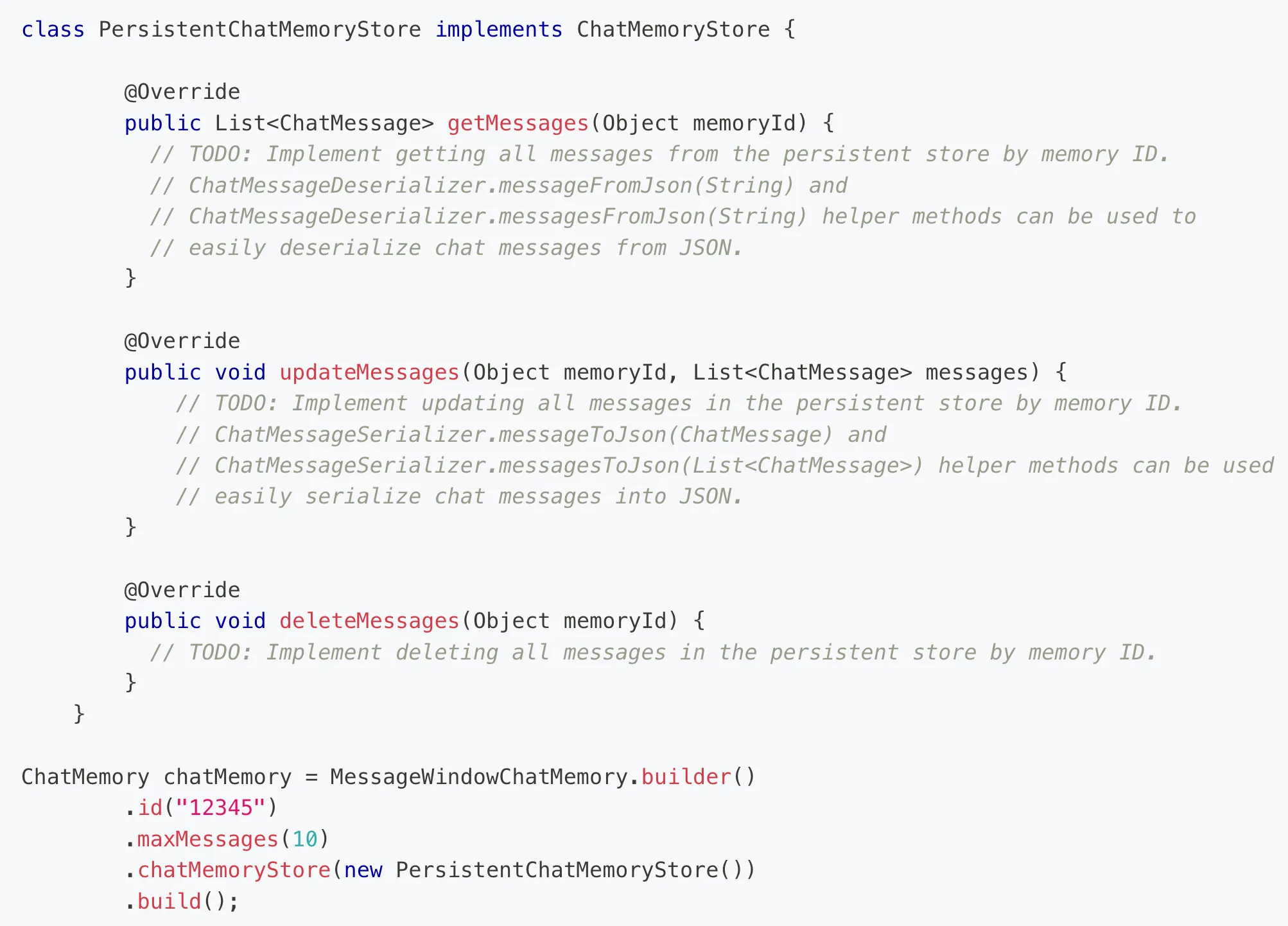
如果有多个用户,希望每个用户之间的消息隔离,可以通过给对话方法增加 memoryId 参数和注解,在调用对话时传入 memoryId 即可(类似聊天室的房间号):
String chat(@MemoryId int memoryId, @UserMessage String userMessage);构造 AI Service 时,可以通过 chatMemoryProvider 来指定 每个 memoryId 单独创建会话记忆:
// 构造 AI ServiceAiCodeHelperService aiCodeHelperService = AiServices.builder(AiCodeHelperService.class) .chatModel(qwenChatModel) .chatMemoryProvider(memoryId -> MessageWindowChatMemory.withMaxMessages(10)) .build();结构化输出
结构化输出是指将大模型返回的文本输出转换为结构化的数据格式,比如一段 JSON、一个对象、或者是复杂的对象列表。
结构化输出有 3 种实现方式:
- 利用大模型的 JSON schema
- 利用 Prompt + JSON Mode
- 利用 Prompt
默认是 Prompt 模式,也就是在原本的用户提示词下 拼接一段内容 来指定大模型强制输出包含特定字段的 JSON 文本。
你是一个专业的信息提取助手。请从给定文本中提取人员信息,并严格按照以下 JSON 格式返回结果:
{ "name": "人员姓名", "age": 年龄数字, "height": 身高(米), "married": true/false, "occupation": "职业"}
重要规则:1. 只返回 JSON 格式,不要添加任何解释2. 如果信息不明确,使用 null3. age 必须是数字,不是字符串4. married 必须是布尔值可以 阅读这篇文章 了解更多,不过我们开发时无需关心这些,只要修改对话方法的返回值,框架就会自动帮我们实现结构化输出,非常爽!
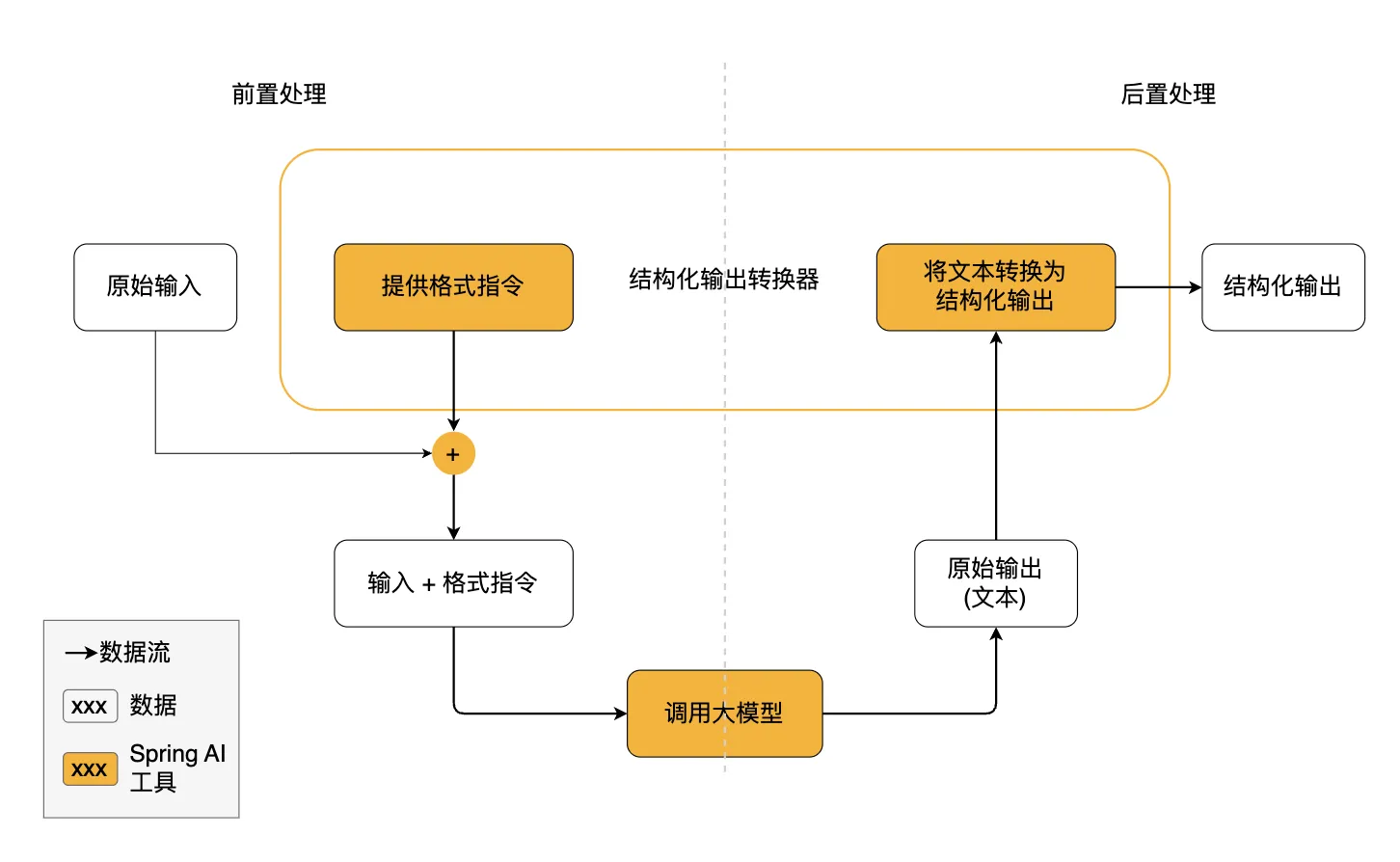
比如我们增加一个 让 AI 生成学习报告 的方法,AI 需要输出学习报告对象,包含名称和建议列表:
@SystemMessage(fromResource = "system-prompt.txt")Report chatForReport(String userMessage);
// 学习报告record Report(String name, List<String> suggestionList){}@Testvoid testChatForReport() { String userMessage = "我有Java和C语言的编程基础,我想学习rust这门语言并达到能自己写出来一个带界面的项目的水平,请帮我指定学习报告."; AiCodeHelperService.Report report = aiCodeHelperService.chatForReport(userMessage); System.out.println(report.toString());}测试结果:
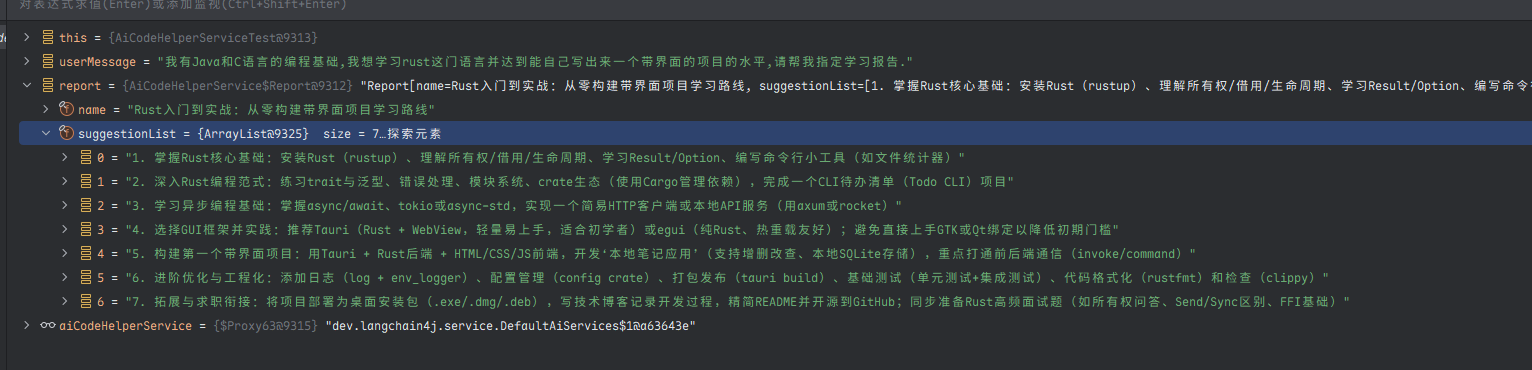
如果你发现 AI 有时无法生成准确的 JSON,那么可以采用 JSON Schema 模式,直接在请求中约束 LLM 的输出格式。这是目前最可靠、精确度最高的结构化输出实现。
ResponseFormat responseFormat = ResponseFormat.builder() .type(JSON) .jsonSchema(JsonSchema.builder() .name("Person") .rootElement(JsonObjectSchema.builder() .addStringProperty("name") .addIntegerProperty("age") .addNumberProperty("height") .addBooleanProperty("married") .required("name", "age", "height", "married") .build()) .build()) .build();ChatRequest chatRequest = ChatRequest.builder() .responseFormat(responseFormat) .messages(userMessage) .build();检索增强生成 - RAG
RAG(Retrieval-Augmented Generation,检索增强生成)是一种结合信息检索技术和 AI 内容生成的混合架构,可以解决大模型的知识时效性限制和幻觉问题。
简单来说,RAG 就像给 AI 配了一个 “小抄本”,让 AI 回答问题前先查一查特定的知识库来获取知识,确保回答是基于真实资料而不是凭空想象。很多企业也基于 RAG 搭建了自己的智能客服,可以用自己积累的领域知识回复用户。
RAG 的完整工作流程如下:
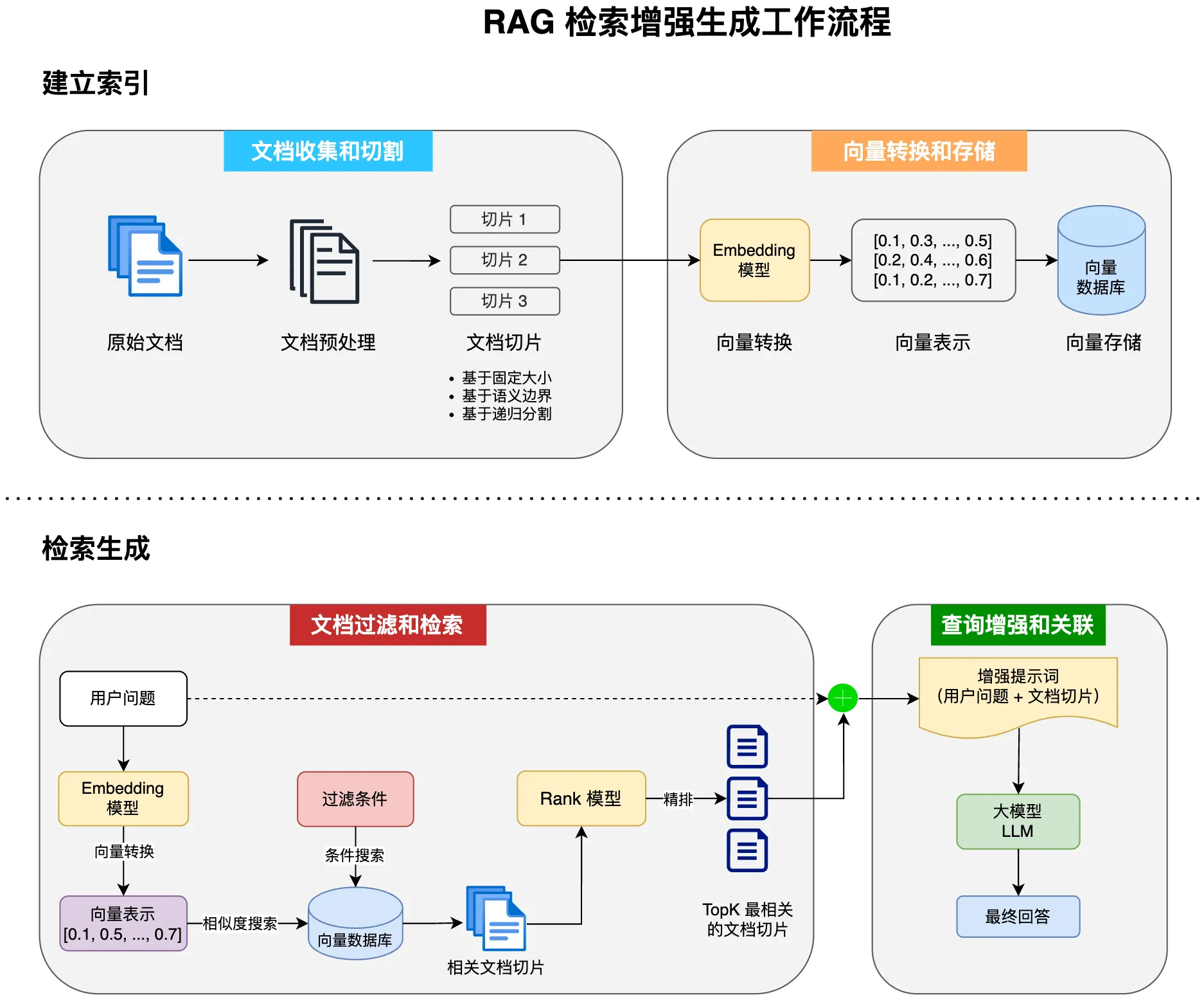
LangChain 提供了 3 种 RAG 的实现方式,我把它称为:极简版、标准版、进阶版。
极简版 RAG
极简版适合快速查看效果,首先需要引入额外的依赖,里面包含了内置的离线 Embedding 模型,开箱即用:
<dependency> <groupId>dev.langchain4j</groupId> <artifactId>langchain4j-easy-rag</artifactId> <version>1.1.0-beta7</version></dependency>示例代码如下,使用内置的文档加载器读取文档,然后利用内置的 Embedding 模型将文档转换成向量,并存储在内置的 Embedding 内存存储中,最后给 AI Service 绑定默认的内容检索器。
// RAG// 1. 加载文档List<Document> documents = FileSystemDocumentLoader.loadDocuments("src/main/resources/docs");// 2. 使用内置的 EmbeddingModel 转换文本为向量,然后存储到自动注入的内存 embeddingStore 中EmbeddingStoreIngestor.ingest(documents, embeddingStore);// 构造 AI ServiceAiCodeHelperService aiCodeHelperService = AiServices.builder(AiCodeHelperService.class) .chatModel(qwenChatModel) .chatMemory(chatMemory) // RAG:从内存 embeddingStore 中检索匹配的文本片段 .contentRetriever(EmbeddingStoreContentRetriever.from(embeddingStore)) .build();极简版的特点是 “一切皆默认”,实际开发中,为了更好的效果,建议采用标准版或进阶版。
标准版 RAG
下面来试试标准版 RAG 实现,为了更好地效果,我们需要:
- 加载 Markdown 文档并按需切割
- Markdown 文档补充文件名信息
- 自定义 Embedding 模型
- 自定义内容检索器
在 Spring Boot 配置文件中添加 Embedding 模型配置,使用阿里云提供的 text-embedding-v4 模型:
langchain4j: community: dashscope: chat-model: model-name: qwen-max api-key: <You API Key here> embedding-model: model-name: text-embedding-v4 api-key: <You API Key here>新建 rag.RagConfig,编写 RAG 相关的代码,执行 RAG 的初始流程并返回了一个定制的内容检索器 Bean:
/** * Rag标准版配置类 * @author ShineAcZ * @date 2026/4/30 */@Configurationpublic class RagConfig {
@Resource private EmbeddingModel qwenEmbeddingModel;
// 内存向量数据库(存文档切片) @Resource private EmbeddingStore<TextSegment> embeddingStore;
// 内容检索器 @Bean public ContentRetriever contentRetriever(){ // ---RAG--- // 1. 加载文档 List<Document> documents = FileSystemDocumentLoader.loadDocuments("src/main/resources/docs"); // 2. 切割文档:按照段落切割,最大1000字符,最大重叠200字符(有多种不同的切割策略,但是这里用的是按段落切割) DocumentByParagraphSplitter documentByParagraphSplitter = new DocumentByParagraphSplitter(1000, 200); // 3. 定义文档加载器,把文档转化为向量并存到向量数据库中 EmbeddingStoreIngestor embeddingStoreIngestor = EmbeddingStoreIngestor.builder() .documentSplitter(documentByParagraphSplitter) // 给文档切片加上元数据信息(这里是加上了文件名在前面,可以给ai提供更多可用信息) .textSegmentTransformer(textSegment -> TextSegment.from(textSegment.metadata().getString("file_name")+"\n"+textSegment.text(),textSegment.metadata())) // 使用的向量模型 .embeddingModel(qwenEmbeddingModel) .embeddingStore(embeddingStore) .build(); // 加载文档 embeddingStoreIngestor.ingest(documents); // 4. 自定义内容检索器 return EmbeddingStoreContentRetriever.builder() .embeddingStore(embeddingStore) .embeddingModel(qwenEmbeddingModel) // 最多五条 .maxResults(5) // 最低相似度(低于这个值将查不出来,需要结果测试才能得知合适的值) .minScore(0.75) .build(); }}然后在构建 AI Service 时绑定内容检索器:
@Resourceprivate ContentRetriever contentRetriever;
@Beanpublic AiCodeHelperService aiCodeHelperService() { // 会话记忆 ChatMemory chatMemory = MessageWindowChatMemory.withMaxMessages(10); // 构造 AI Service AiCodeHelperService aiCodeHelperService = AiServices.builder(AiCodeHelperService.class) .chatModel(qwenChatModel) .chatMemory(chatMemory) .contentRetriever(contentRetriever) // RAG 检索增强生成 .build(); return aiCodeHelperService;}编写单元测试:
@Testvoid testChatRAG() { String chat = aiCodeHelperService.chat("怎么学习Java?有哪些常见的面试题?"); System.out.println(chat);}然后接下来看RagConfig的构造过程,可以发现它将四个文档切了150多个切片,然后每个切片匹配一个向量。
查看AI服务类的上下文记忆可以看到,发过去的请求是包含了文档信息的:
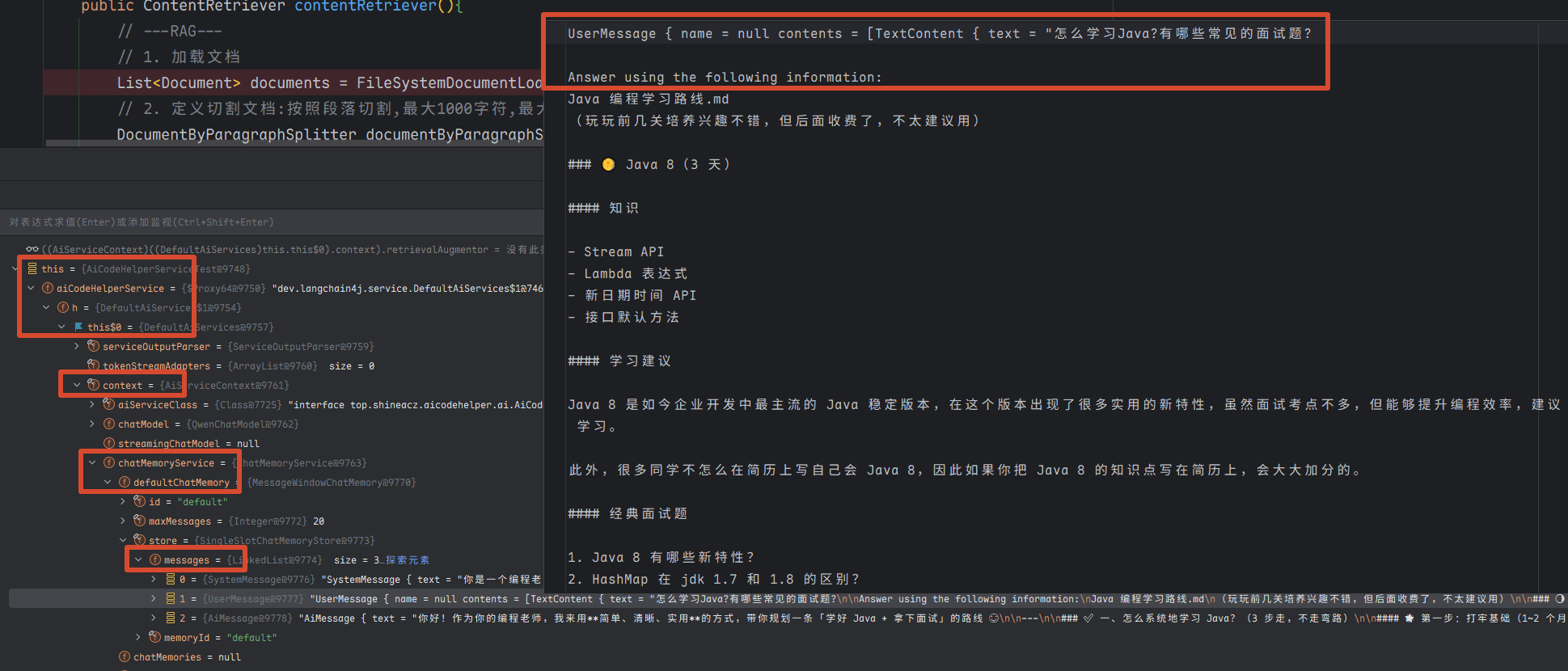
说明成功用上了RAG检索。
获取引用源文档
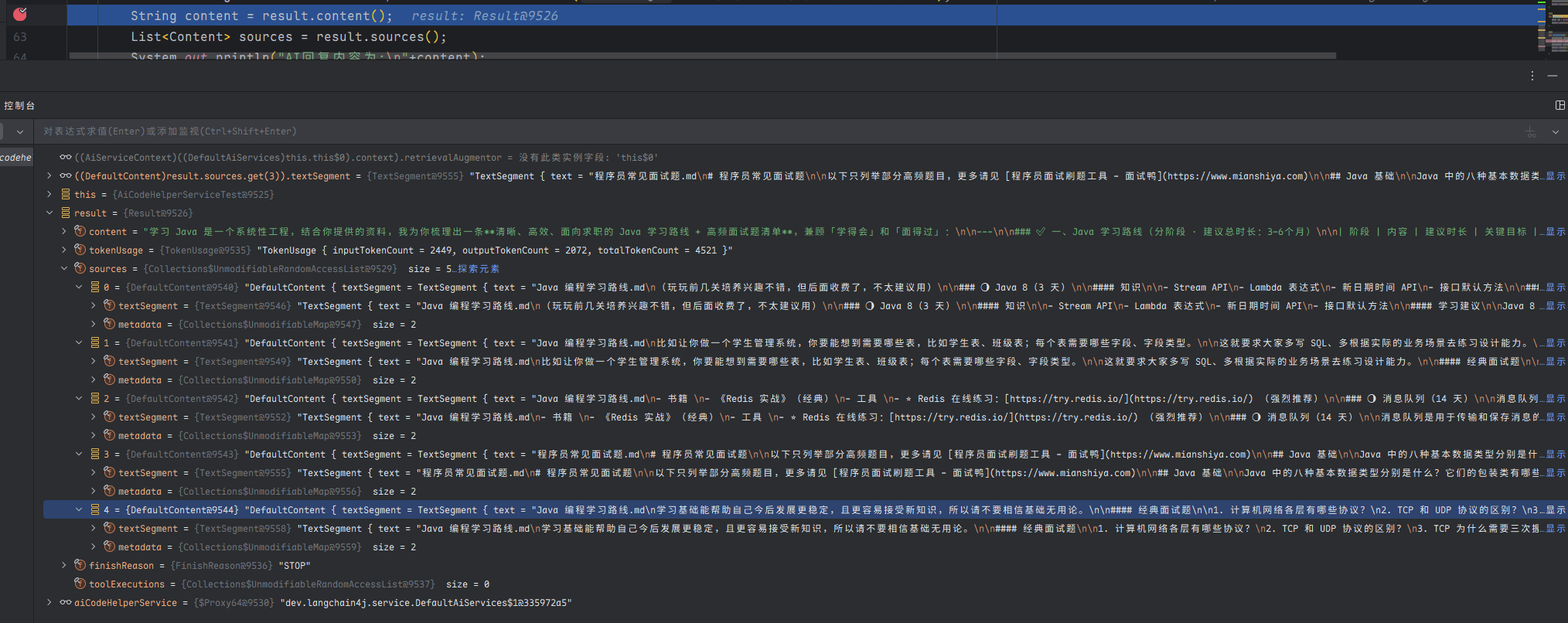
在 LangChain4j 中,实现这个功能很简单。在 AI Service 中新增方法,在原本的返回类型外封装一层 Result 类,就可以获得封装后的结果,从中能够获取到 RAG 引用的源文档、以及 Token 的消耗情况等等。
@SystemMessage(fromResource = "system-prompt.txt")Result<String> chatWithRag(String userMessage);修改单元测试,输出更多信息:
@Testvoid chatWithRag() { Result<String> result = aiCodeHelperService.chatWithRag("怎么学习 Java?有哪些常见面试题?"); String content = result.content(); List<Content> sources = result.sources(); System.out.println(content); System.out.println(sources);}执行效果如图,获取到了引用的源文档信息:
进阶版 RAG
这就是一套标准的 RAG 实现了,大多数时候,使用标准版就够了。进阶版会更加灵活,额外支持查询转换器、查询路由、内容聚合器、内容注入器等特性,将整个 RAG 的流程流水线化(RAG pipeline)。
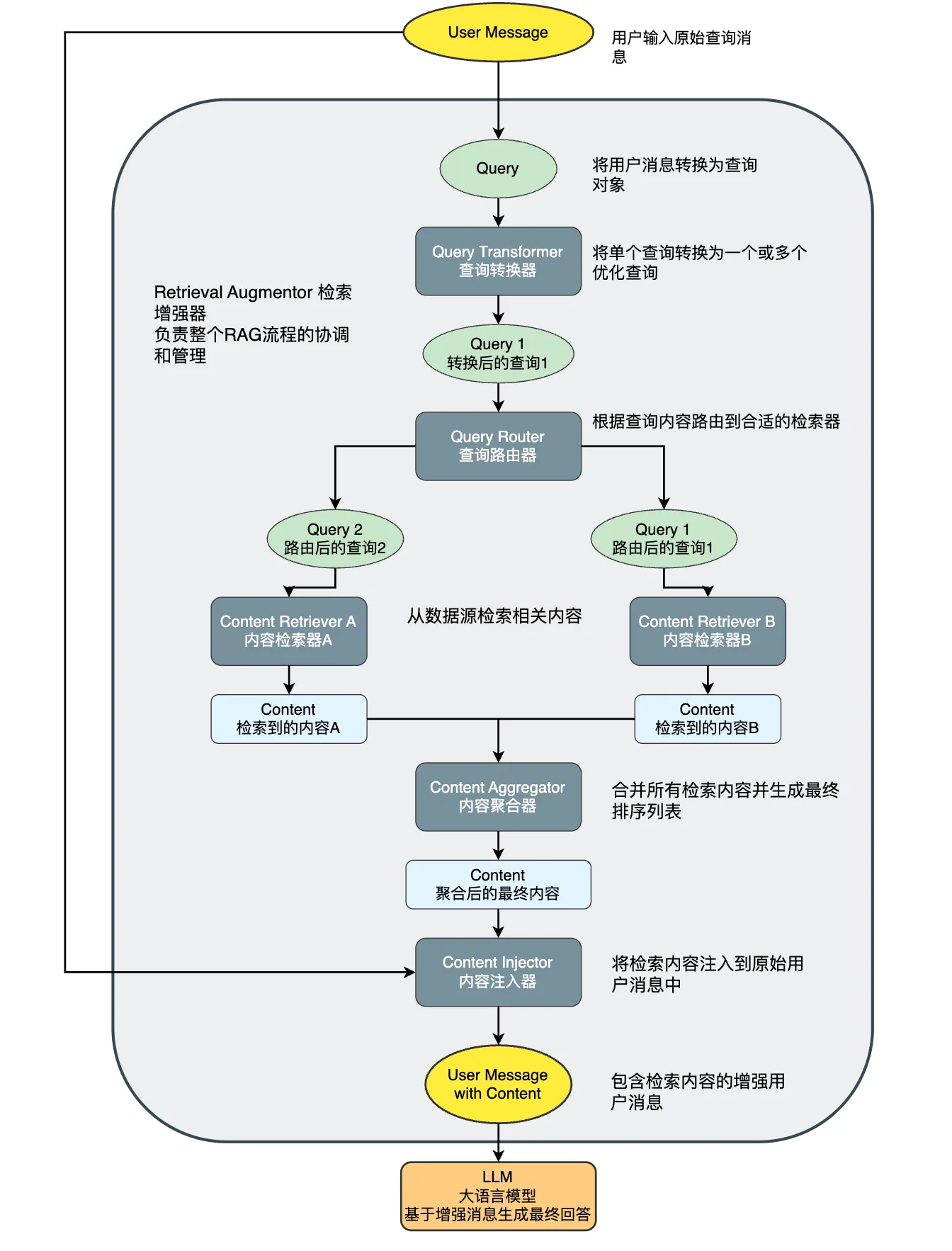
定义好 RAG 流程后,最后通过 RetrievalAugmentor 提供给 AI Service:
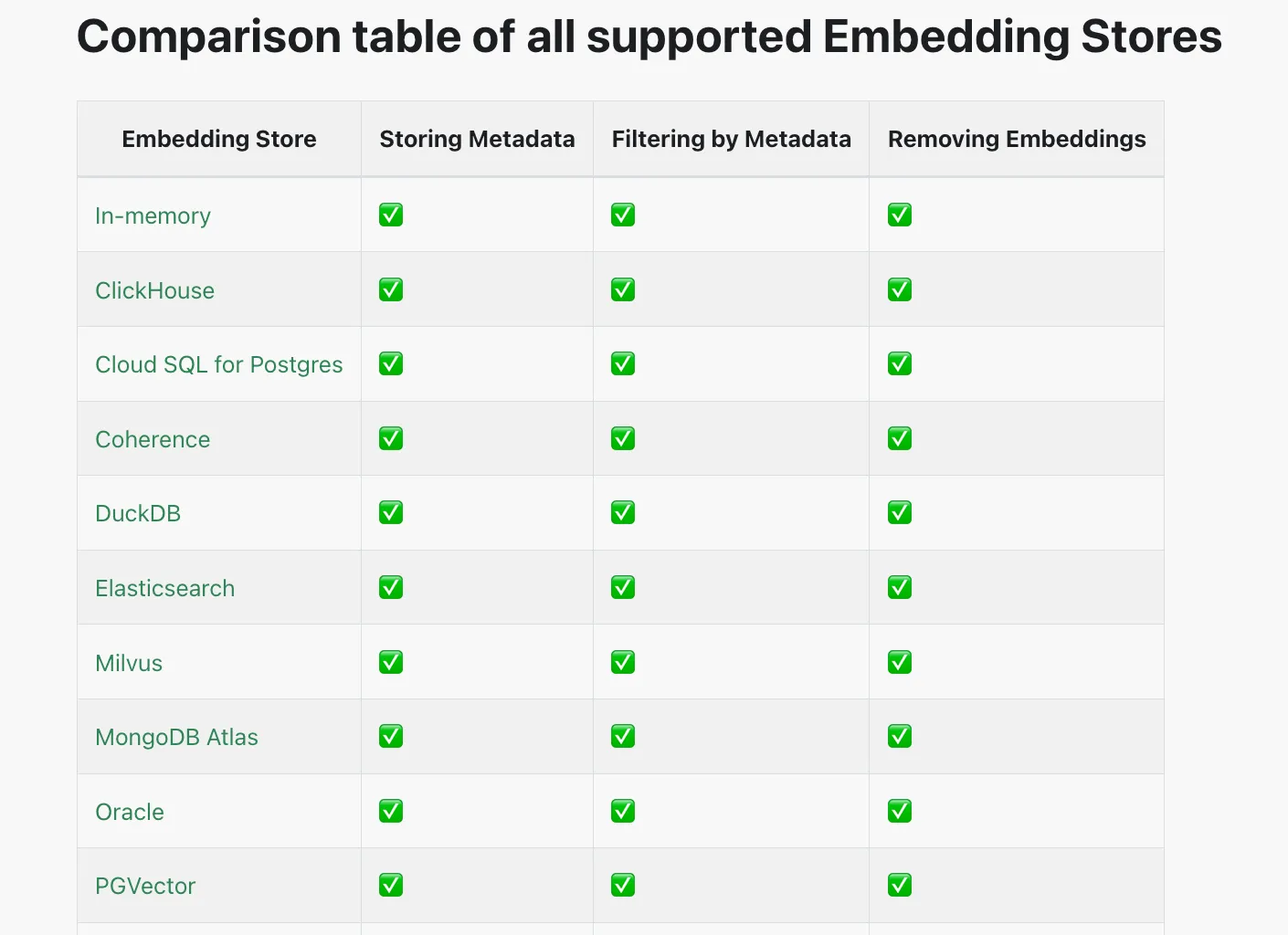
AiServices.builder(xxx.class) ... .retrievalAugmentor(retrievalAugmentor) .build();此外,之前我们使用的是内存向量存储,每次启动都要重新加载文档、调用嵌入模型,比较耗时,所以实际开发中建议使用独立的存储,官方支持很多第三方存储,但是比较推荐使用的是 PG Vector,在原有关系库的基础上安装插件来支持向量存储,而且支持的特性很多。
工具调用 - Tools
工具调用(Tool Calling)可以理解为让 AI 大模型 借用外部工具 来完成它自己做不到的事情。
跟人类一样,如果只凭手脚完成不了工作,那么就可以利用工具箱来完成。
工具可以是任何东西,比如网页搜索、对外部 API 的调用、访问外部数据、或执行特定的代码等。
比如用户提问 “帮我查询上海最新的天气”,AI 本身并没有这些知识,它就可以调用 “查询天气工具”,来完成任务。
需要注意的是,工具调用的本质 并不是 AI 服务器自己调用这些工具、也不是把工具的代码发送给 AI 服务器让它执行,它只能提出要求,表示 “我需要执行 XX 工具完成任务”。而真正执行工具的是我们自己的应用程序,执行后再把结果告诉 AI,让它继续工作。
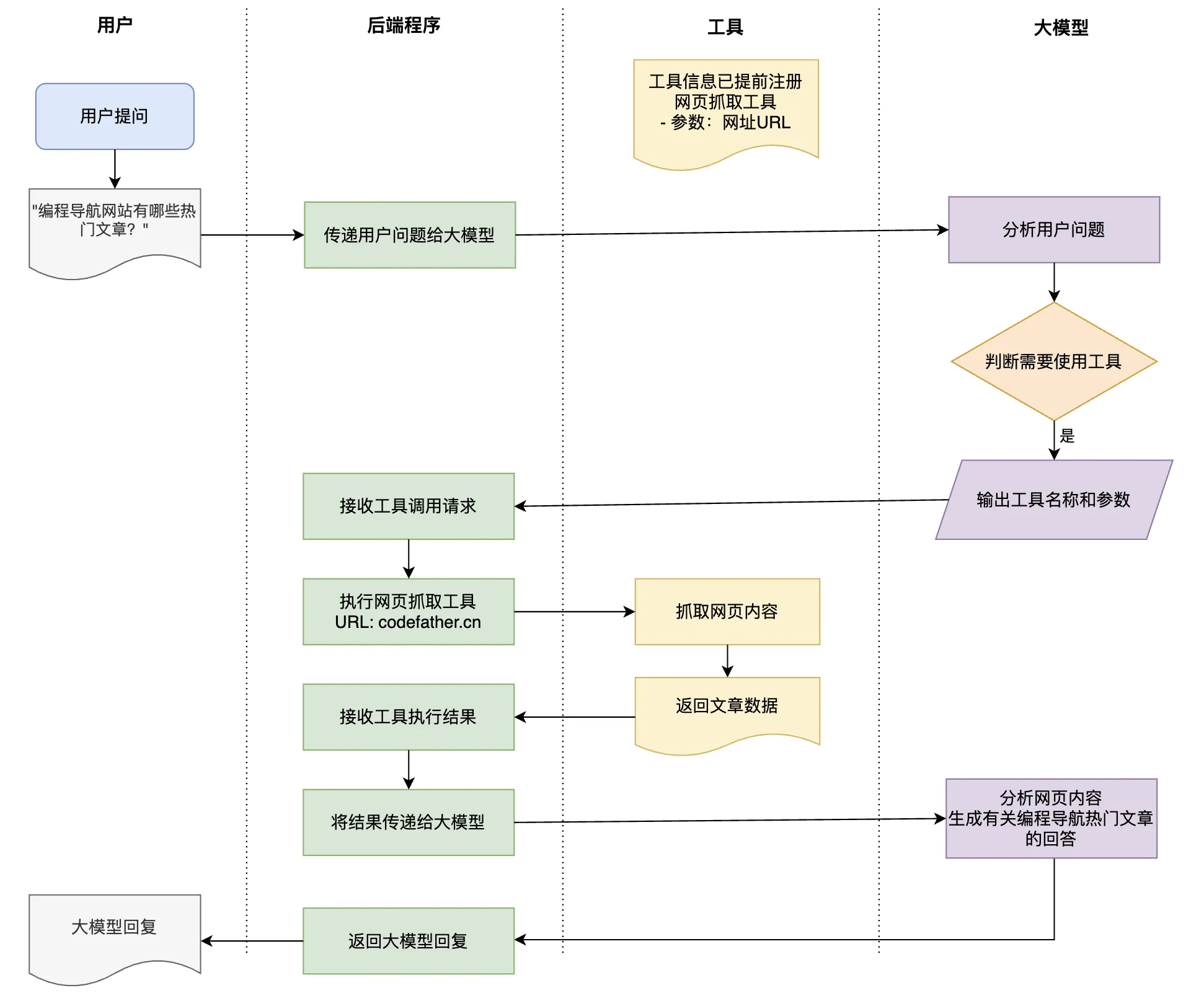
百度搜索支持通过 URL 参数传入不同的搜索关键词。
这里我准备尝试使用Jsoup库,让ai能去百度搜索结果并抓取搜索页面内容返回给我。
先引入 Jsoup 库:
<dependency> <groupId>org.jsoup</groupId> <artifactId>jsoup</artifactId> <version>1.20.1</version></dependency>然后在 tools 包下编写工具,通过 @Tool 注解就能声明工具了,注意 要认真编写工具和工具参数的描述,这直接决定了 AI 能否正确地调用工具。
@Slf4jpublic class InterviewQuestionTool {
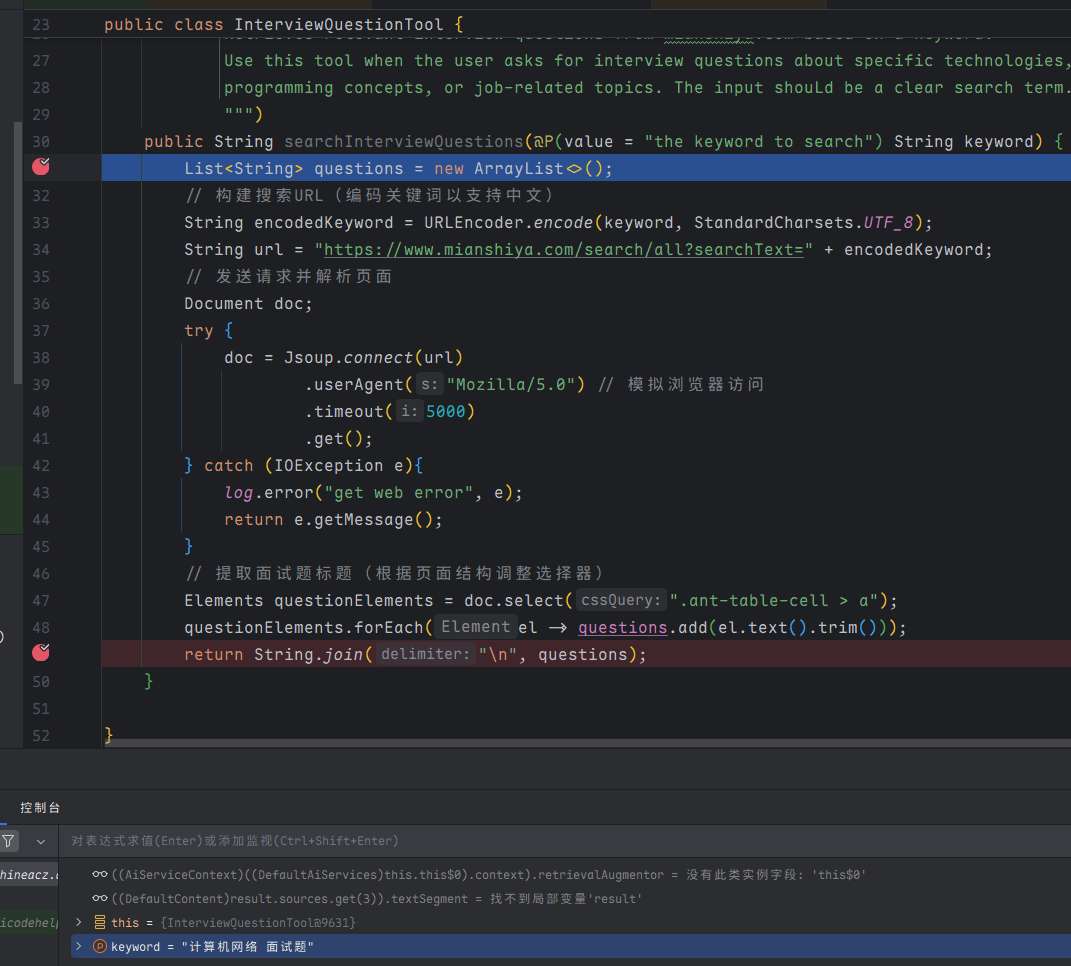
/** * 从面试鸭网站获取关键词相关的面试题列表 * * @param keyword 搜索关键词(如"redis"、"java多线程") * @return 面试题列表,若失败则返回错误信息 */ @Tool(name = "interviewQuestionSearch", value = """ Retrieves relevant interview questions from mianshiya.com based on a keyword. Use this tool when the user asks for interview questions about specific technologies, programming concepts, or job-related topics. The input should be a clear search term. """ ) public String searchInterviewQuestions(@P(value = "the keyword to search") String keyword) { List<String> questions = new ArrayList<>(); // 构建搜索URL(编码关键词以支持中文) String encodedKeyword = URLEncoder.encode(keyword, StandardCharsets.UTF_8); String url = "https://www.mianshiya.com/search/all?searchText=" + encodedKeyword; // 发送请求并解析页面 Document doc; try { doc = Jsoup.connect(url) .userAgent("Mozilla/5.0") .timeout(5000) .get(); } catch (IOException e) { log.error("get web error", e); return e.getMessage(); } // 提取面试题 Elements questionElements = doc.select(".ant-table-cell > a"); questionElements.forEach(el -> questions.add(el.text().trim())); return String.join("\n", questions); }}给 AI Service 绑定工具:
// 构造 AI ServiceAiCodeHelperService aiCodeHelperService = AiServices.builder(AiCodeHelperService.class) .chatModel(qwenChatModel) .chatMemory(chatMemory) .contentRetriever(contentRetriever) // RAG 检索增强生成 .tools(new InterviewQuestionTool()) // 工具调用 .build();编写单元测试
@Testvoid chatWithTools() { String result = aiCodeHelperService.chat("有哪些常见的计算机网络面试题?"); System.out.println(result);}Debug 运行,发现 AI 调用了工具,工具去网站中搜索了面试题并得到了列表。
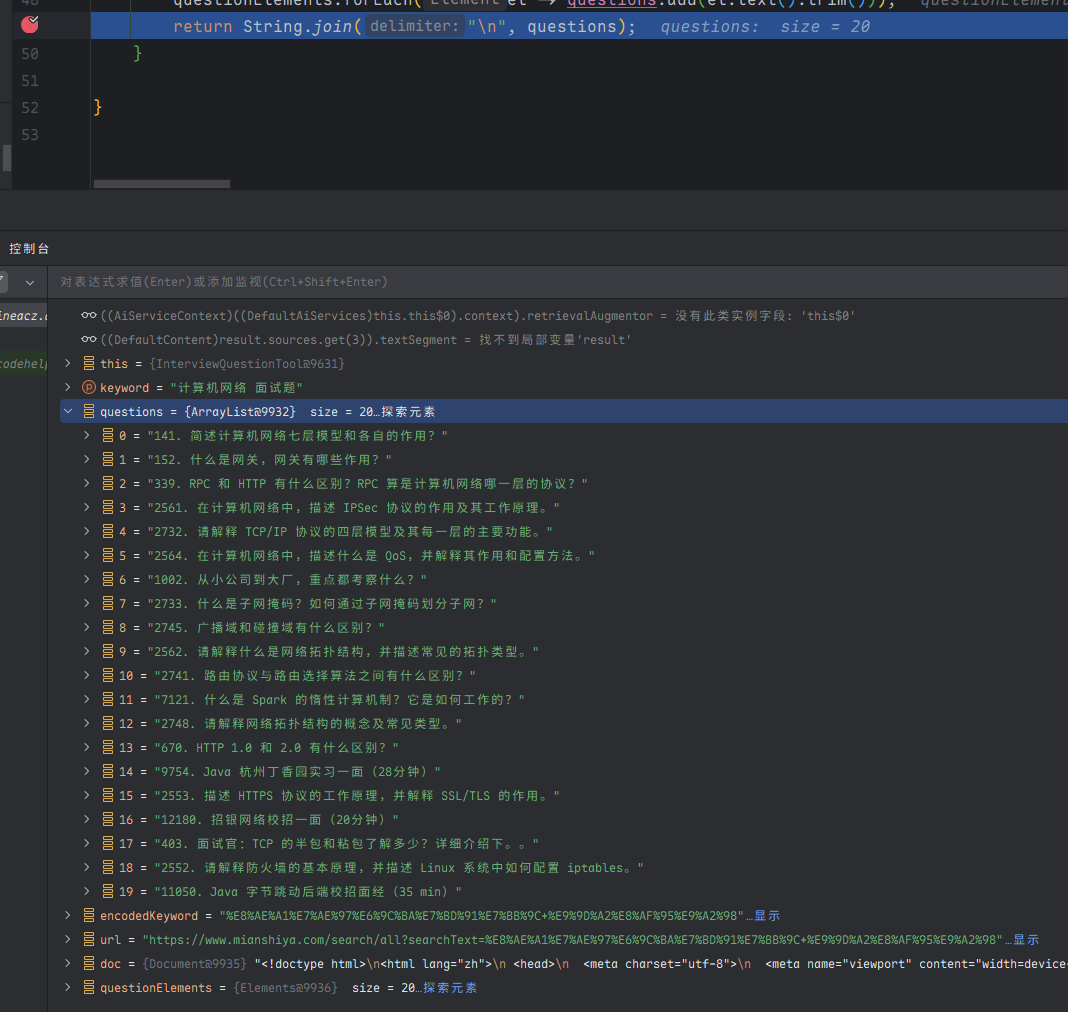
Debug AICodeHelperService可以发现它加载了工具:
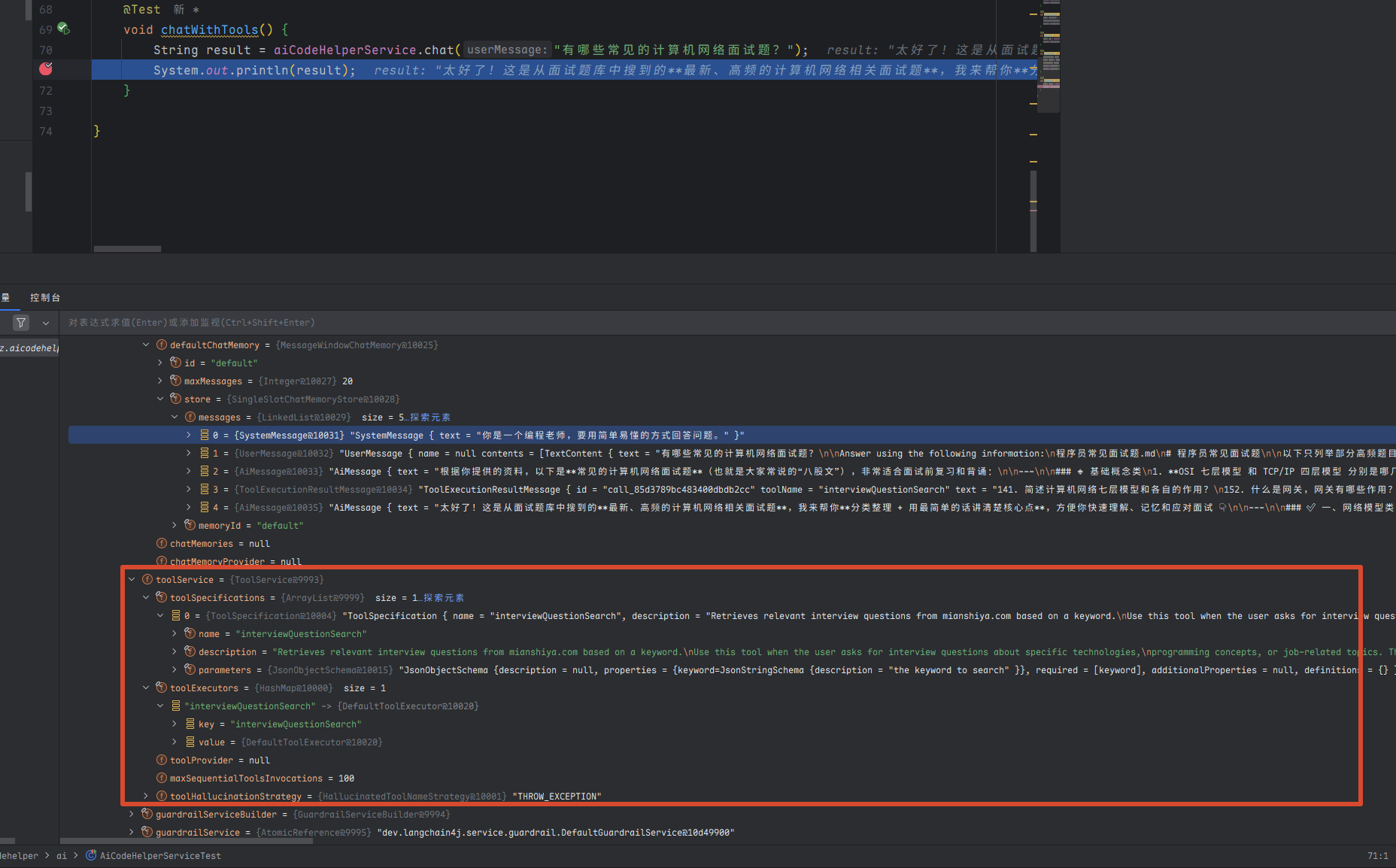
输出的结果也符合预期。
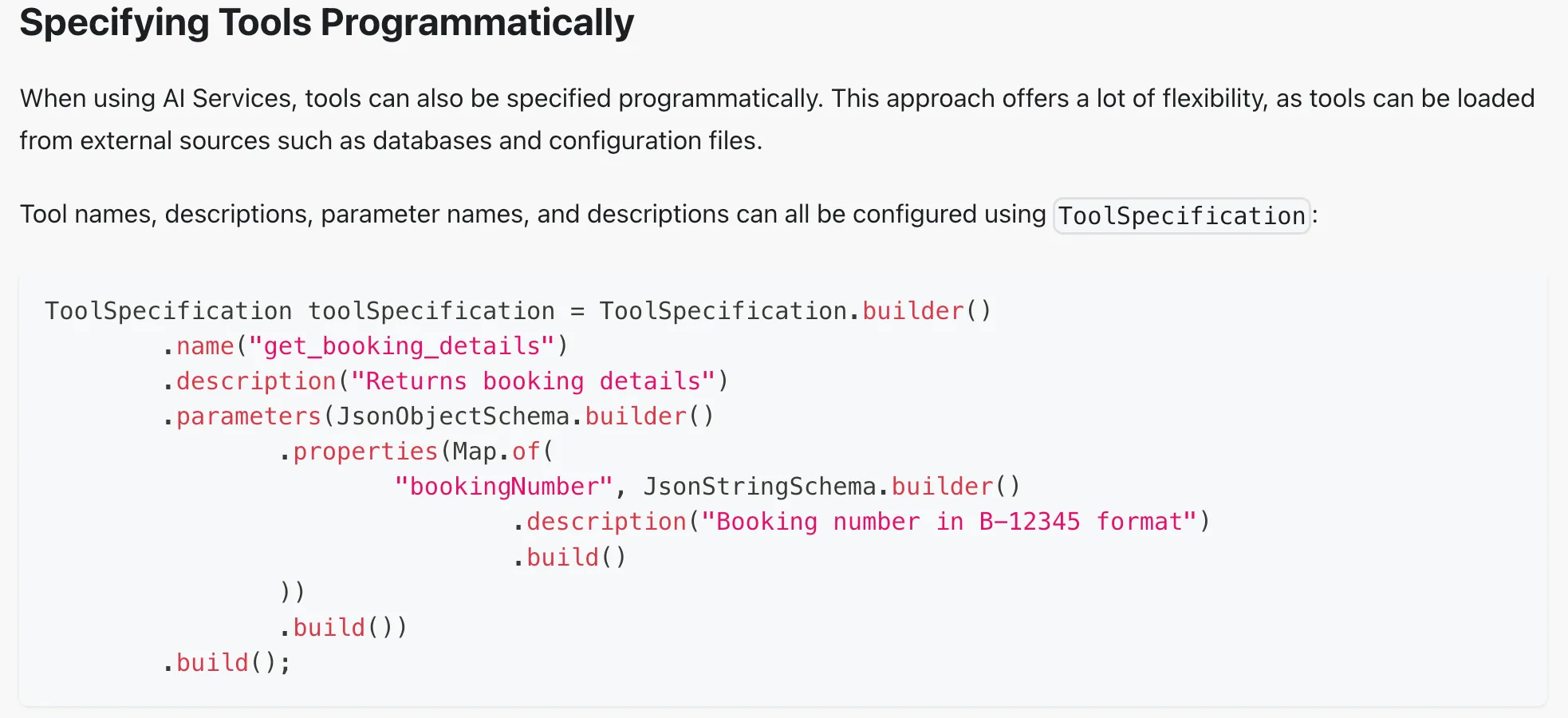
前面只演示了最简单的工具定义方法 —— 声明式,LangChain4j 也提供了编程式的工具定义方法
但是编程式创建工具比较麻烦。
除了联网搜索外,还有一些经典的工具,比如文件读写、PDF 生成、调用终端、输出图表等等。这些工具我们可以自己开发,也可以通过 MCP 直接使用别人开发好的工具。
模型上下文协议 - MCP
MCP(Model Context Protocol,模型上下文协议)是一种开放标准,目的是增强 AI 与外部系统的交互能力。MCP 为 AI 提供了与外部工具、资源和服务交互的标准化方式,让 AI 能够访问最新数据、执行复杂操作,并与现有系统集成。
可以将 MCP 想象成 AI 应用的 USB 接口。就像 USB 为设备连接各种外设和配件提供了标准化方式一样,MCP 为 AI 模型连接不同的数据源和工具提供了标准化的方法。
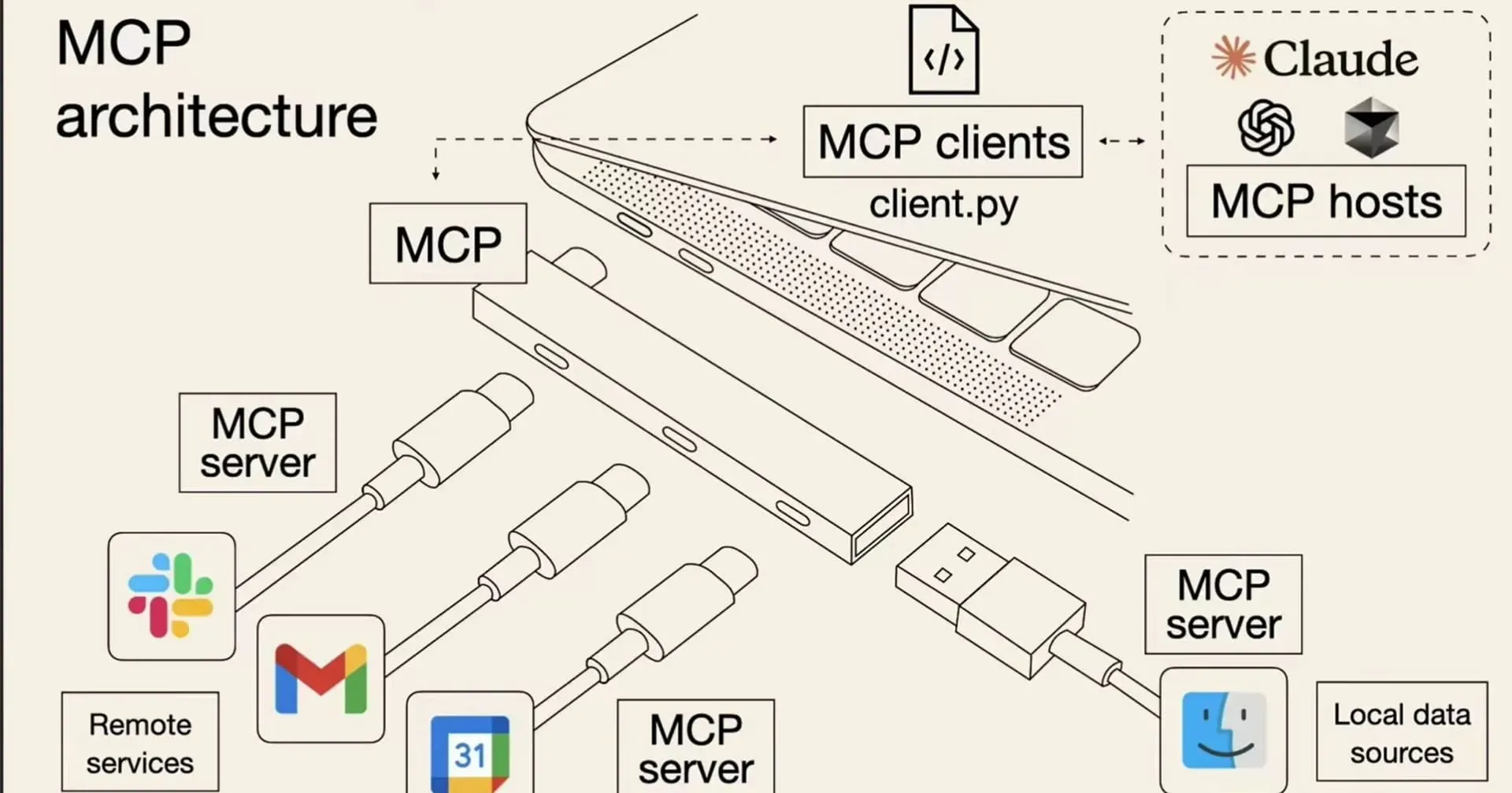
简单来说,通过 MCP 协议,AI 应用可以轻松接入别人提供的服务来实现更多功能,比如查询地理位置、操作数据库、部署网站、甚至是支付等等。
刚刚我们通过工具调用实现了面试题的搜索,下面我们利用 MCP 实现 全网搜索内容,这也是一个典型的 MCP 应用场景了。
首先从 MCP 服务市场搜索 Web Search 服务,推荐 下面这个,因为它提供了 SSE 在线调用服务,不用我们自己在本地安装启动,很方便。
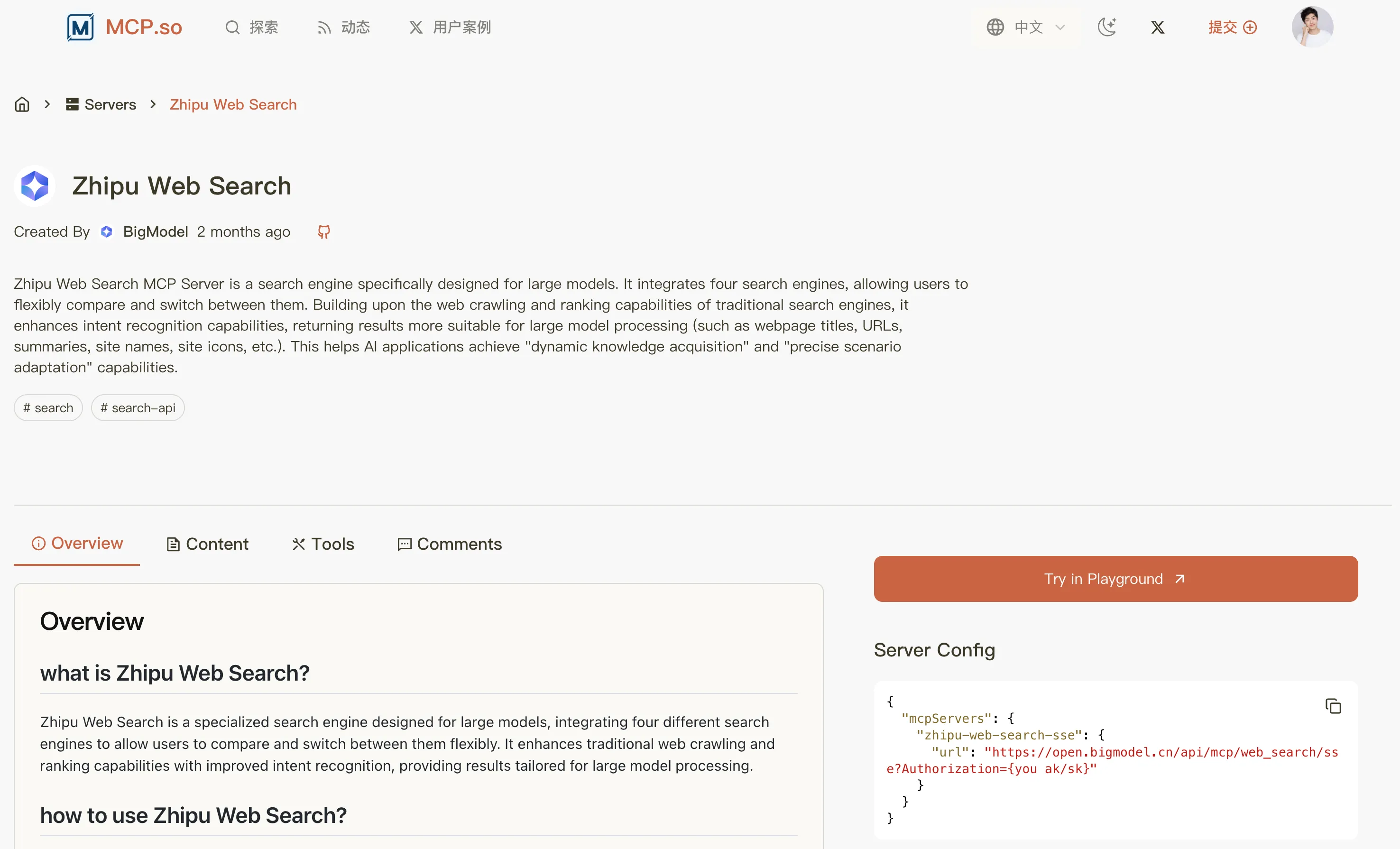
但也要注意,用别人的服务可能是需要 API Key 的,一般是按量付费。 需要先去 平台官方获取 API Key,等会儿会用到:
然后引入MCP的依赖
<!-- https://mvnrepository.com/artifact/dev.langchain4j/langchain4j-mcp --><dependency> <groupId>dev.langchain4j</groupId> <artifactId>langchain4j-mcp</artifactId> <version>1.1.0-beta7</version></dependency>新增key配置
bigmodel: api-key: <Your Api Key>新建 mcp.McpConfig,按照官方的开发方式,初始化和 MCP 服务的通讯,并创建 McpToolProvider 的 Bean:
@Configurationpublic class McpConfig {
@Value("${bigmodel.api-key}") private String apiKey;
@Bean public McpToolProvider mcpToolProvider() { // 和 MCP 服务通讯 McpTransport transport = new HttpMcpTransport.Builder() .sseUrl("https://open.bigmodel.cn/api/mcp/web_search/sse?Authorization=" + apiKey) .logRequests(true) // 开启日志,查看更多信息 .logResponses(true) .build(); // 创建 MCP 客户端 McpClient mcpClient = new DefaultMcpClient.Builder() .key("yupiMcpClient") .transport(transport) .build(); // 从 MCP 客户端获取工具 McpToolProvider toolProvider = McpToolProvider.builder() .mcpClients(mcpClient) .build(); return toolProvider; }}注意,上面我们是通过 SSE 的方式调用 MCP。如果你是通过 npx 或 uvx 本地启动 MCP 服务,需要先安装对应的工具,并且利用下面的配置建立通讯:
McpTransport transport = new StdioMcpTransport.Builder() .command(List.of("/usr/bin/npm", "exec", "@modelcontextprotocol/server-everything@0.6.2")) .logEvents(true) // only if you want to see the traffic in the log .build();在 AI Service 中应用 MCP 工具:
@Resourceprivate McpToolProvider mcpToolProvider;
// 构造 AI ServiceAiCodeHelperService aiCodeHelperService = AiServices.builder(AiCodeHelperService.class) .chatModel(qwenChatModel) .chatMemory(chatMemory) .contentRetriever(contentRetriever) // RAG 检索增强生成 .tools(new InterviewQuestionTool()) // 工具调用 .toolProvider(mcpToolProvider) // MCP 工具调用 .build();书写单元测试
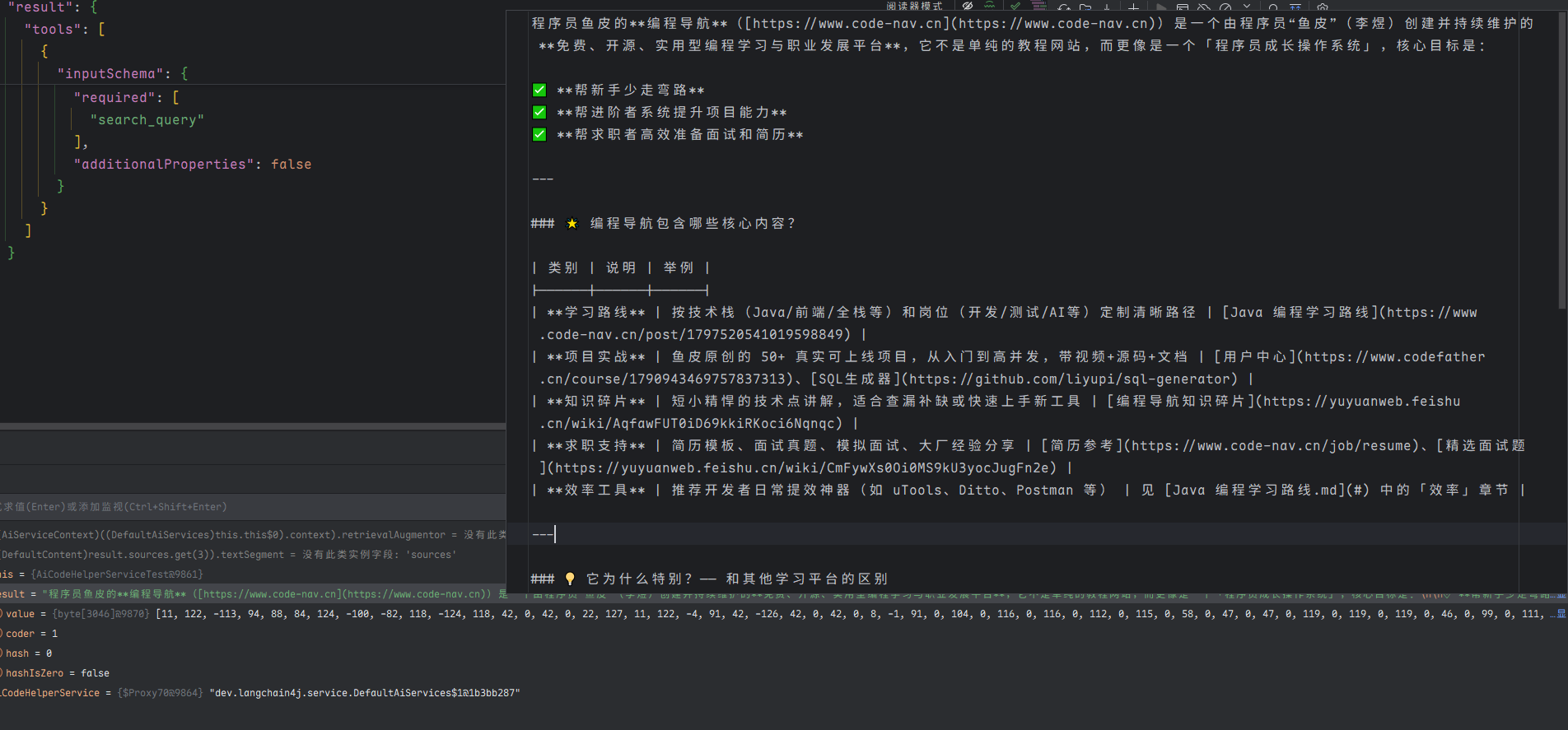
@Testvoid chatWithMcp() { String result = aiCodeHelperService.chat("什么是程序员鱼皮的编程导航?"); System.out.println(result);}测试结果有包括网址 并且日志也有显示出搜索的日志 说明MCP生效了
护轨 - Guardrail
可以理解为拦截器。分为输入护轨(input guardrails)和输出护轨(output guardrails),可以在请求 AI 前和接收到 AI 的响应后执行一些额外操作,比如调用 AI 前鉴权、调用 AI 后记录日志。
让我们小试一把,在调用 AI 前进行敏感词检测,如果用户提示词包含敏感词,则直接拒绝。
新建 guardrail.SafeInputGuardrail,实现 InputGuardrail 接口:
实现接口可以看到有什么方法:
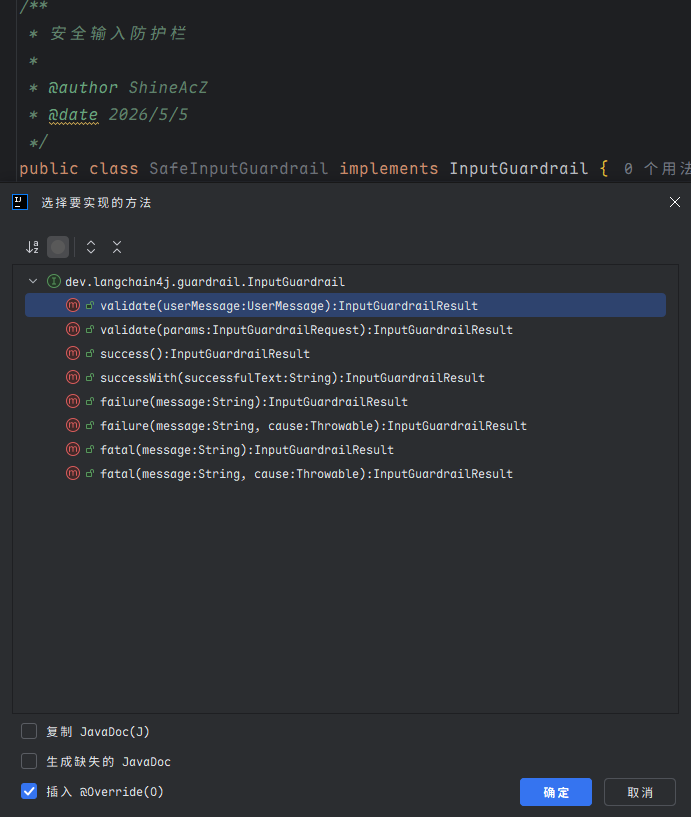
这里实现validate 可以获取用户信息来校验,它返回一个护轨结果InputGuardrailResult
/** * 安全检测输入护轨 */public class SafeInputGuardrail implements InputGuardrail {
private static final Set<String> sensitiveWords = Set.of("kill", "evil");
/** * 检测用户输入是否安全 */ @Override public InputGuardrailResult validate(UserMessage userMessage) { // 获取用户输入并转换为小写以确保大小写不敏感 String inputText = userMessage.singleText().toLowerCase(); // 使用正则表达式分割输入文本为单词 String[] words = inputText.split("\\W+"); // 遍历所有单词,检查是否存在敏感词 for (String word : words) { if (sensitiveWords.contains(word)) { return fatal("Sensitive word detected: " + word); } } return success(); }}LangChain4j 提供了几种快速返回的方法,简单来说,想继续调用 AI 就返回 success、否则就返回 fatal。
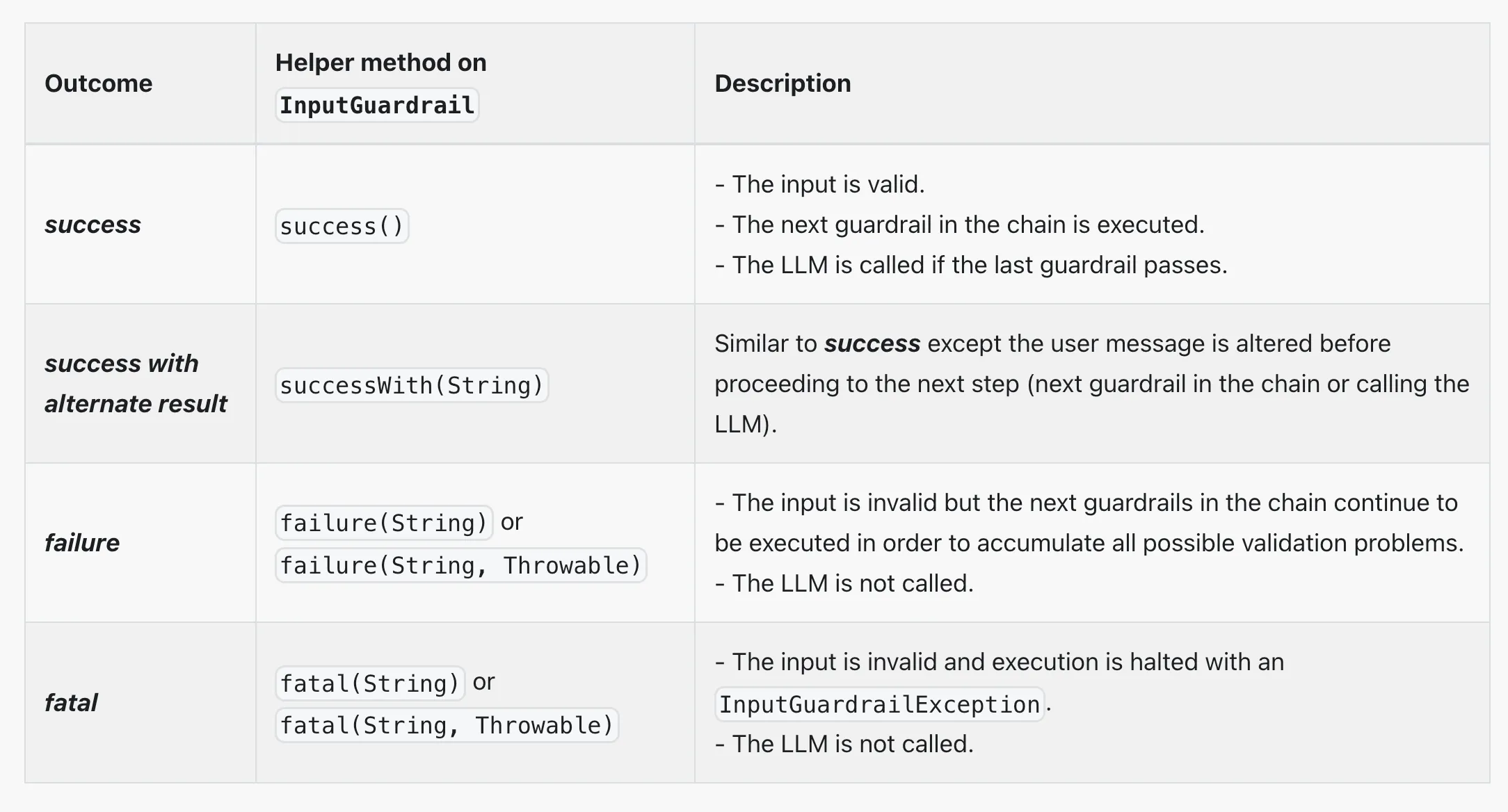
修改 AI Service,使用输入护轨:
@InputGuardrails({SafeInputGuardrail.class})public interface AiCodeHelperService {
@SystemMessage(fromResource = "system-prompt.txt") String chat(String userMessage);
@SystemMessage(fromResource = "system-prompt.txt") Report chatForReport(String userMessage);
// 学习报告 record Report(String name, List<String> suggestionList) { }}编写单元测试,写一个包含敏感词的提示词:
@Testvoid chatWithGuardrail() { String result = aiCodeHelperService.chat("kill the game"); System.out.println(result);}运行并查看效果,会触发输入检测,直接抛出异常:
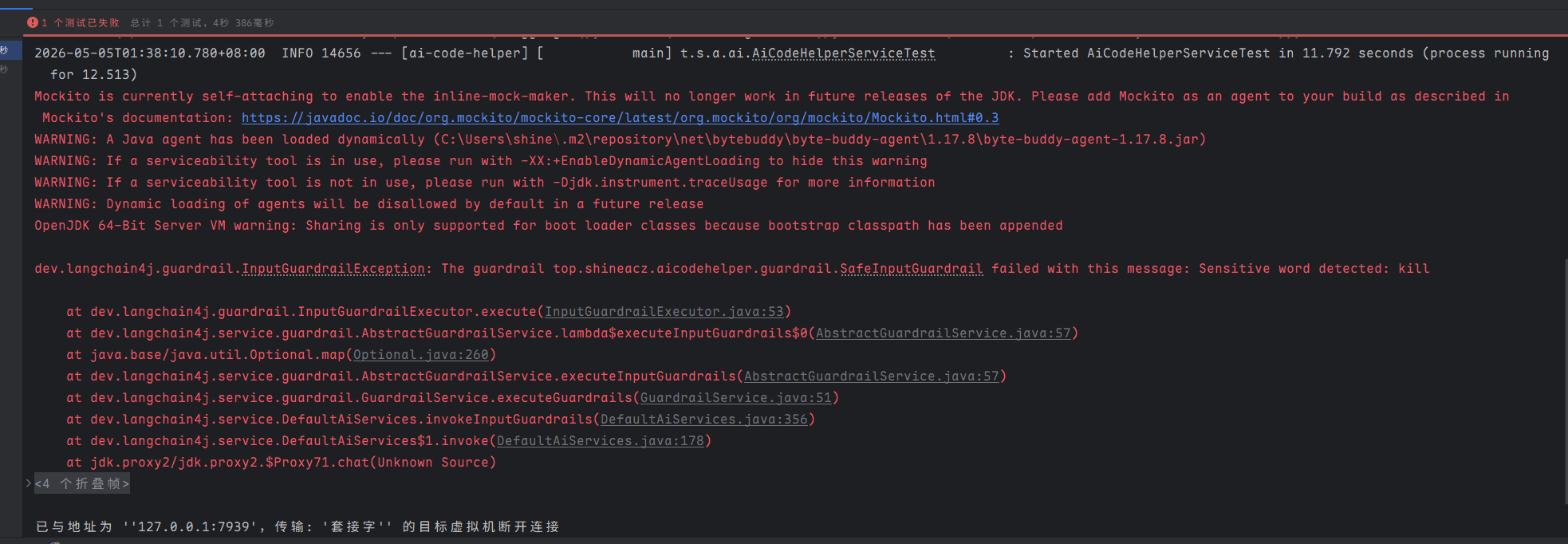
如果不包含敏感词,则会顺利通过。
当然,除了输入护轨,也可以编写输出护轨,对 AI 的响应结果进行检测。
日志和可观测性
之前我们都是通过 Debug 查看运行信息,不仅不便于调试,而且生产环境肯定不能这么做。
官方提供了 日志 和 可观测性,来帮我们更好地调试程序、发现问题。
日志
开启日志的方法很简单,直接构造模型时指定开启、或者直接编写 Spring Boot 配置,支持打印 AI 请求和响应日志。
OpenAiChatModel.builder() ... .logRequests(true) .logResponses(true) .build();langchain4j.open-ai.chat-model.log-requests = truelangchain4j.open-ai.chat-model.log-responses = truelogging.level.dev.langchain4j = DEBUG但并不是所有的 ChatModel 都支持,比如测试下来 QwenChatModel 就不支持。这时只能把希望交给可观测性了。
可观测性
可以通过自定义 Listener 获取 ChatModel 的调用信息,比较灵活。
新建 listener.ChatModelListenerConfig,输出请求、响应、错误信息:
@Configuration@Slf4jpublic class ChatModelListenerConfig {
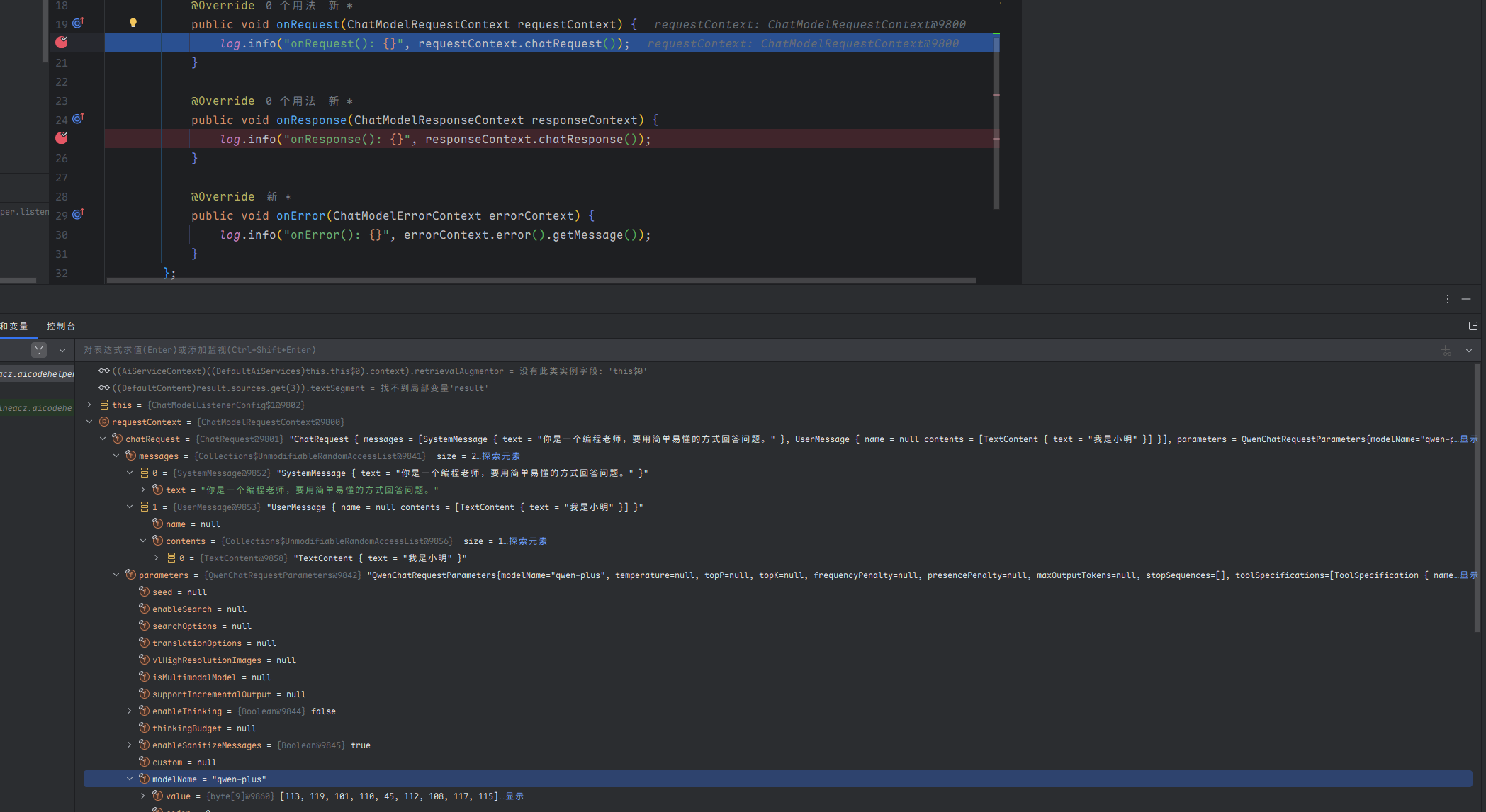
@Bean ChatModelListener chatModelListener() { return new ChatModelListener() { @Override public void onRequest(ChatModelRequestContext requestContext) { log.info("onRequest(): {}", requestContext.chatRequest()); }
@Override public void onResponse(ChatModelResponseContext responseContext) { log.info("onResponse(): {}", responseContext.chatResponse()); }
@Override public void onError(ChatModelErrorContext errorContext) { log.info("onError(): {}", errorContext.error().getMessage()); } }; }}但是只定义 Listener 好像对 QwenChatModel 不起作用,所以我们需要手动构造自定义的 QwenChatModel。
新建 model.QwenChatModelConfig,构造 ChatModel 对象并绑定 Listener:
@Configuration@ConfigurationProperties(prefix = "langchain4j.community.dashscope.chat-model")@Datapublic class QwenChatModelConfig {
private String modelName;
private String apiKey;
@Resource private ChatModelListener chatModelListener;
@Bean public ChatModel myQwenChatModel() { return QwenChatModel.builder() .apiKey(apiKey) .modelName(modelName) .listeners(List.of(chatModelListener)) .build(); }}然后,可以将原本引用 ChatModel 的名称改为 myQwenChatModel,防止和 Spring Boot 自动注入的 ChatModel 冲突。
再次调用 AI,就能看到很多信息了:
AI 服务化
至此,AI 的能力基本开发完成,但是目前只支持本地运行,需要编写一个接口提供给前端调用,让 AI 能够成为一个服务。
我们平时开发的大多数接口都是同步接口,也就是等后端处理完再返回。但是对于 AI 应用,特别是响应时间较长的对话类应用,可能会让用户失去耐心等待,因此推荐使用 SSE(Server-Sent Events)技术实现实时流式输出,类似打字机效果,大幅提升用户体验
SSE 流式接口开发
LangChain 提供了 2 种方式来支持流式响应(注意,流式响应不支持结构化输出)。
一种方法是 TokenStream,先让 AI 对话方法返回 TokenStream,然后创建 AI Service 时指定流式对话模型 StreamingChatModel:
interface Assistant {
TokenStream chat(String message);}
StreamingChatModel model = OpenAiStreamingChatModel.builder() .apiKey(System.getenv("OPENAI_API_KEY")) .modelName(GPT_4_O_MINI) .build();
Assistant assistant = AiServices.create(Assistant.class, model);
TokenStream tokenStream = assistant.chat("Tell me a joke");
tokenStream.onPartialResponse((String partialResponse) -> System.out.println(partialResponse)) .onRetrieved((List<Content> contents) -> System.out.println(contents)) .onToolExecuted((ToolExecution toolExecution) -> System.out.println(toolExecution)) .onCompleteResponse((ChatResponse response) -> System.out.println(response)) .onError((Throwable error) -> error.printStackTrace()) .start();我个人会更喜欢另一种方法,使用 Flux 代替 TokenStream,熟悉响应式编程的同学应该对 Flux 不陌生吧?让 AI 对话方法返回 Flux 响应式对象即可。示例代码:
interface Assistant {
Flux<String> chat(String message);}首先需要引入依赖
<dependency> <groupId>dev.langchain4j</groupId> <artifactId>langchain4j-reactor</artifactId> <version>1.1.0-beta7</version></dependency>然后给 AI Service 增加流式对话方法,这里顺便支持下多用户的会话记忆:
// 流式对话Flux<String> chatStream(@MemoryId int memoryId, @UserMessage String userMessage);由于要用到流式模型,需要增加流式模型配置:
langchain4j: community: dashscope: streaming-chat-model: model-name: qwen-max api-key: <Your Api Key>构造 AI Service 时指定流式对话模型(自动注入即可),并且补充会话记忆提供者:
@Resourceprivate StreamingChatModel qwenStreamingChatModel;
AiCodeHelperService aiCodeHelperService = AiServices.builder(AiCodeHelperService.class) .chatModel(myQwenChatModel) .streamingChatModel(qwenStreamingChatModel) .chatMemory(chatMemory) .chatMemoryProvider(memoryId -> MessageWindowChatMemory.withMaxMessages(10)) // 每个会话独立存储 .contentRetriever(contentRetriever) // RAG 检索增强生成 .tools(new InterviewQuestionTool()) // 工具调用 .toolProvider(mcpToolProvider) // MCP 工具调用 .build();最后,编写 Controller 接口。为了方便测试,这里使用 Get 请求:
@RestController@RequestMapping("/ai")public class AiController {
@Resource private AiCodeHelperService aiCodeHelperService;
@GetMapping("/chat") public Flux<ServerSentEvent<String>> chat(int memoryId, String message) { return aiCodeHelperService.chatStream(memoryId, message) .map(chunk -> ServerSentEvent.<String>builder() .data(chunk) .build()); }}增加服务器配置,指定后端端口和接口路径前缀:
server: port: 8081 servlet: context-path: /api启动服务器,用 CURL 工具测试调用:
curl -G 'http://localhost:8081/api/ai/chat' \ --data-urlencode 'message=我是小明' \ --data-urlencode 'memoryId=1'可以看到流式的输出结果:
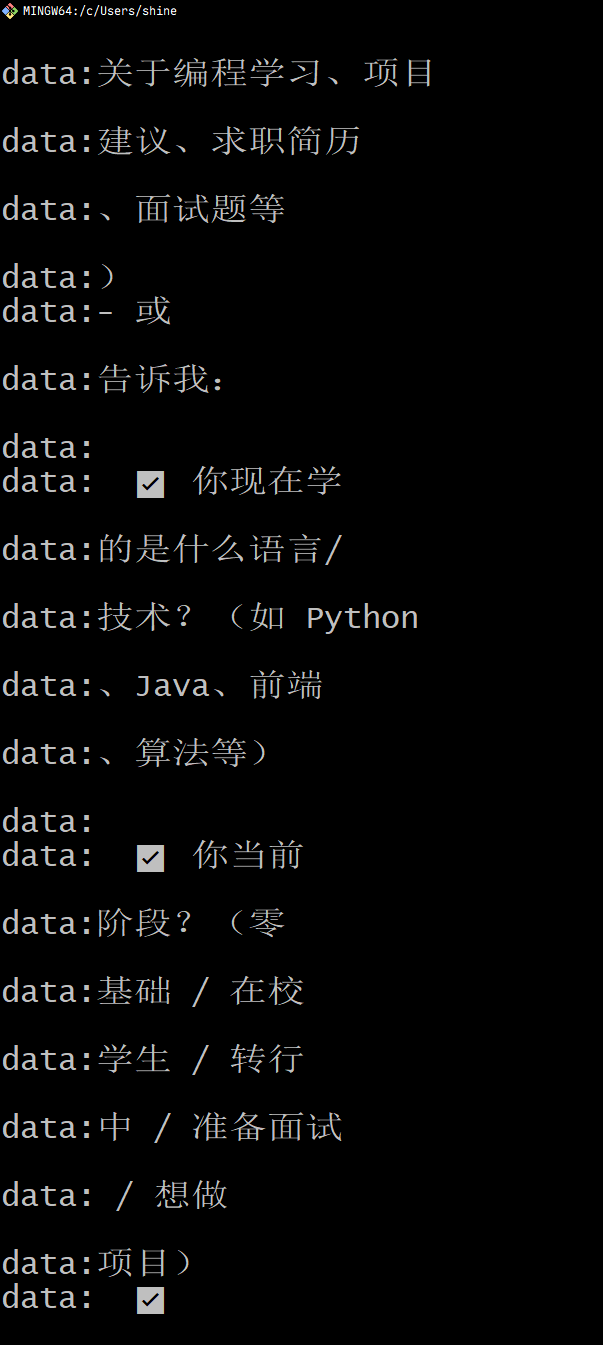
后端支持跨域
为了让前端项目能够顺利调用后端接口,我们需要在后端配置跨域支持。在 config 包下创建跨域配置类,代码如下:
/** * 全局跨域配置 */@Configurationpublic class CorsConfig implements WebMvcConfigurer {
@Override public void addCorsMappings(CorsRegistry registry) { // 覆盖所有请求 registry.addMapping("/**") // 允许发送 Cookie .allowCredentials(true) // 放行哪些域名(必须用 patterns,否则 * 会和 allowCredentials 冲突) .allowedOriginPatterns("*") .allowedMethods("GET", "POST", "PUT", "DELETE", "OPTIONS") .allowedHeaders("*") .exposedHeaders("*"); }}注意,如果 .allowedOrigins("*") 与 .allowCredentials(true) 同时配置会导致冲突,因为出于安全考虑,跨域请求不能同时允许所有域名访问和发送认证信息(比如 Cookie)。
AI 生成前端
由于这个项目不需要很复杂的页面,我们可以利用 AI 来快速生成前端代码,极大提高开发效率。这里鱼皮使用 主流 AI 开发工具 Cursor,挑战不写一行代码,生成符合要求的前端项目。
提示词
首先准备一段详细的 Prompt,一般要包括需求、技术选型、后端接口信息,还可以提供一些原型图、后端代码等。
你是一位专业的前端开发,请帮我根据下列信息来生成对应的前端项目代码。
## 需求
应用为《AI 编程小助手》,帮助用户解答编程学习和求职面试相关的问题,并给出建议。
只有一个页面,就是主页:页面风格为聊天室,上方是聊天记录(用户信息在右边,AI 信息在左边),下方是输入框,进入页面后自动生成一个聊天室 id,用于区分不同的会话。通过 SSE 的方式调用 chat 接口,实时显示对话内容。
## 技术选型
1. Vue3 项目2. Axios 请求库
## 后端接口信息
接口地址前缀:http://localhost:9001/api
## SpringBoot 后端接口代码
@RestController@RequestMapping("/ai")public class AiController {
@GetMapping("/chat") public Flux<ServerSentEvent<String>> chat(int memoryId, String message) { return aiCodeHelperService.chatStream(memoryId, message) .map(chunk -> ServerSentEvent.<String>builder() .data(chunk) .build()); }}
在windows系统开发,你应该使用 Windows 支持的命令来完成任务,并且使用pnpm。开发
在项目根目录下创建新的前端项目文件夹 ai-code-helper-frontend,使用 Cursor 工具打开该目录,输入 Prompt 执行。注意要选择 Agent 模式、Thinking 深度思考模型(推荐 Claude):
生成出来项目后,使用pnpm dev运行(查看package可知,以及我电脑用的是pnpm)
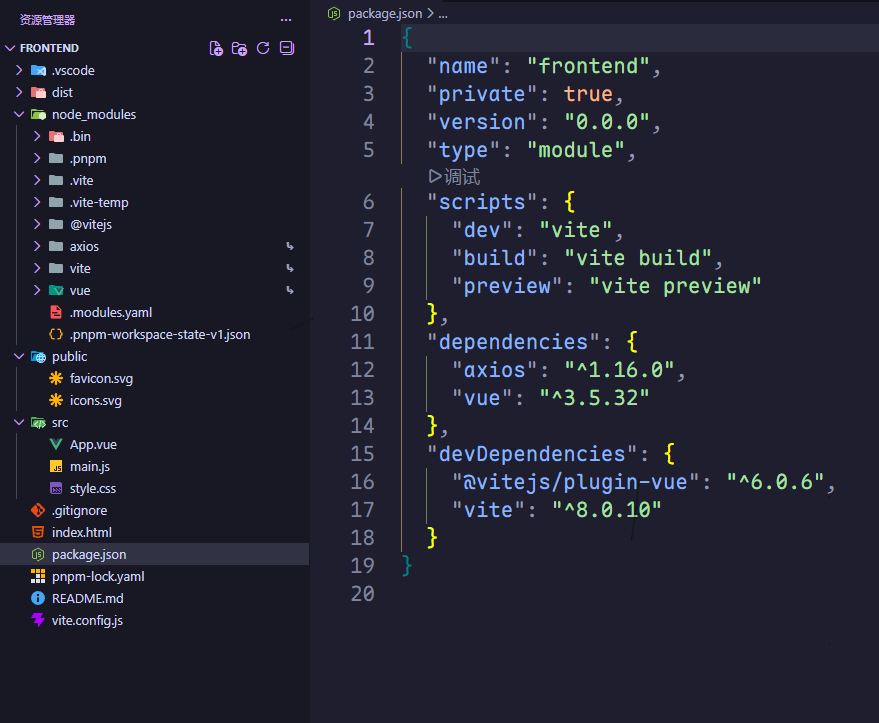
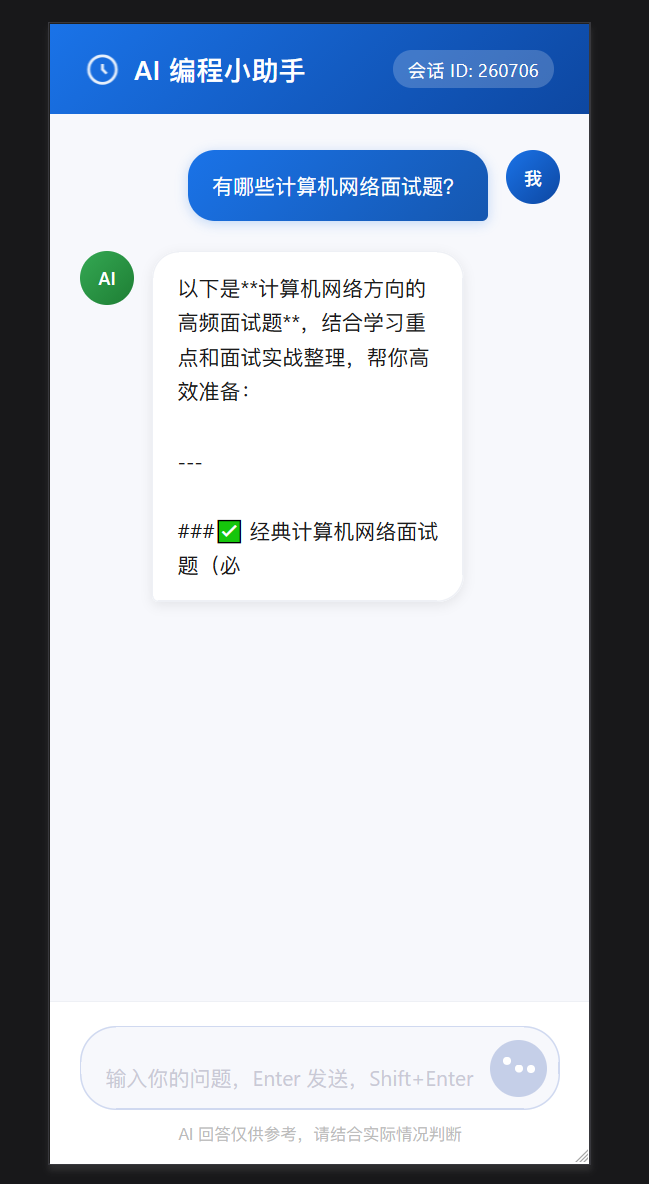
生成的前端界面如下:
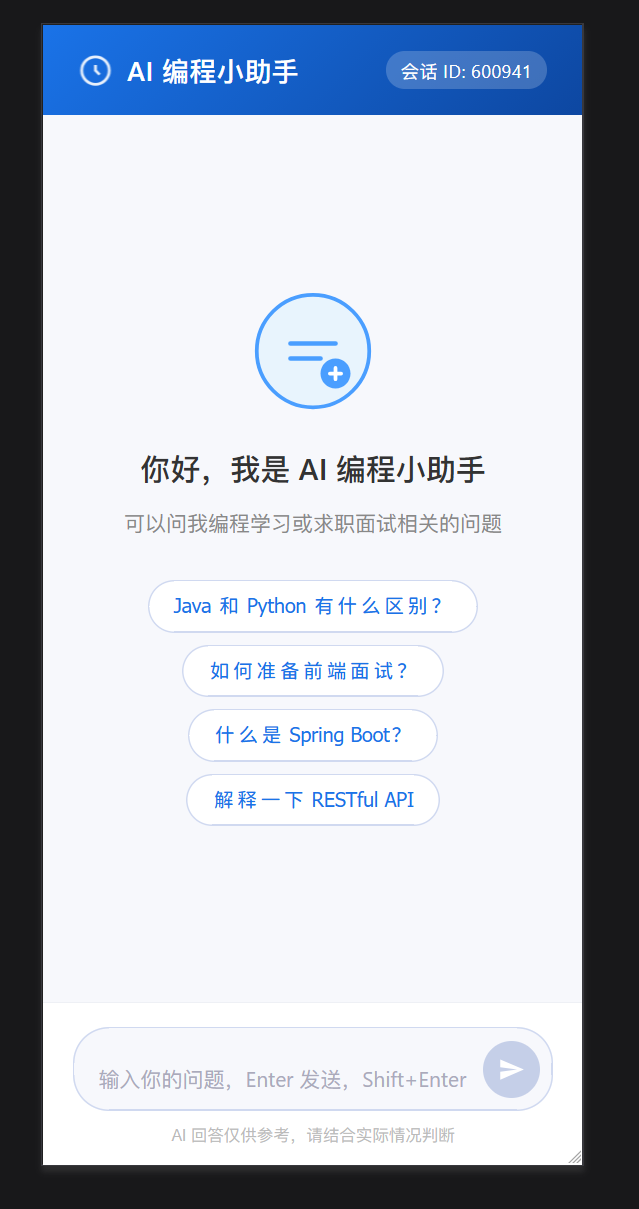 测试提问:
测试提问:
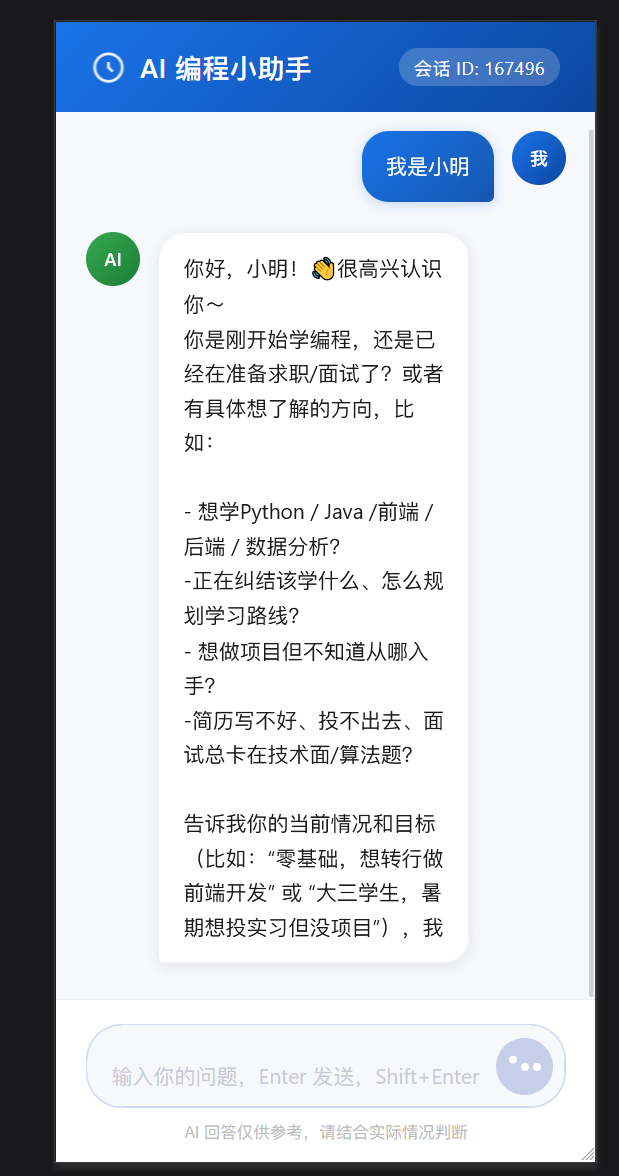
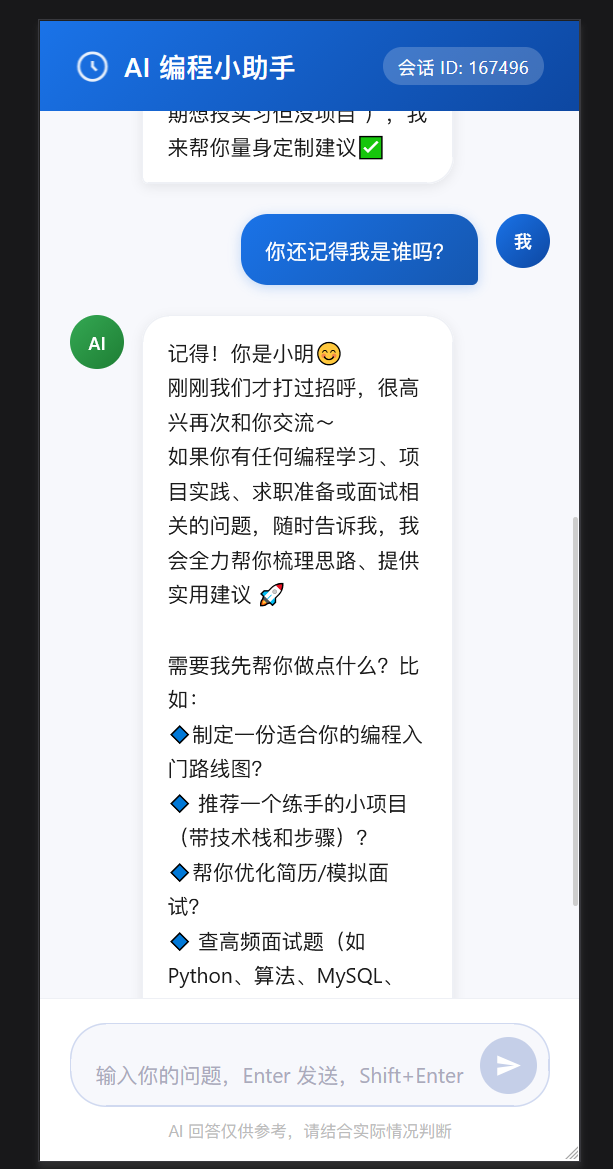
会话记忆功能测试:
总结
实际开发中应该如何选择 AI 开发框架呢?
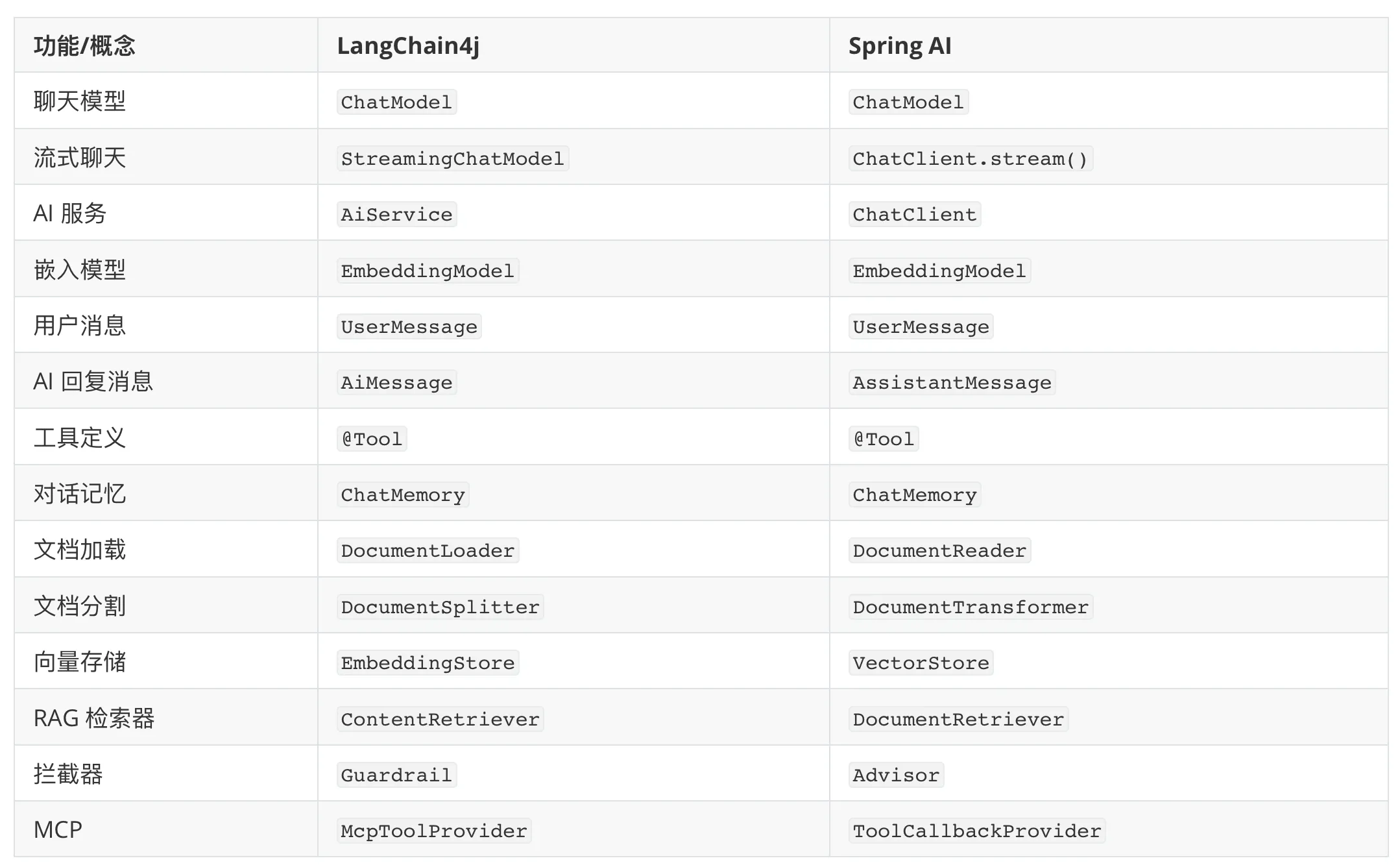
就拿 Spring AI 和 LangChain4j 来说,不知道大家更喜欢哪个框架?我其实会更喜欢 Spring AI 的开发模式,而且 Spring AI 目前支持的能力更多,还有国内 Spring AI Alibaba 的巨头加持,生态更好,遇到问题更容易解决;LangChain4j 的优势在于可以独立于 Spring 项目使用,更自由灵活一些。
不过这类框架重点学习一个就好了,很多概念和用法是相通的: